
Free AggregateRating & Review Snippet Schema Markup Generator (JSON-LD)
Star ratings in Google search results don’t appear by accident.
That row of gold stars you see under a product listing, a restaurant, a book, or a software app in Google’s results — the ones that immediately draw your eye and make you more likely to click — those stars only show up when a page has valid review or rating structured data correctly implemented. Without it, Google has no reliable way to understand that your page contains review content, and your ratings stay invisible in search, no matter how many five-star reviews you’ve collected.
This free Review Snippet Schema Markup Generator creates valid, Google-compliant JSON-LD for both Review and AggregateRating structured data in seconds. Whether you need to mark up a single editorial review, a collection of user reviews, a standalone aggregate rating, or a review nested inside a product or recipe — this generator handles every use case cleanly and accurately.
Fill in your review details, select your schema format, generate the code, and paste it directly into your page. No developer required. No complex nesting to figure out by hand. Just accurate structured data built from Google’s current specification that passes the Rich Results Test without errors.
How To Use This Tool
Choose the type of item being reviewed:
- Restaurant: Food establishments, cafes, bars
- Book: Books, ebooks, audiobooks
- Movie: Films, documentaries
- Organization: Companies, businesses
Fill in the details of what's being reviewed:
- Name: The name of the item/business
- Image: A representative image URL
- Address: For Restaurant and Organization only
- Director & Date Created: For Movie reviews
Complete the review metadata:
- Rating Value: Star rating (1-5)
- Author: Person who wrote the review
- Publisher: Organization publishing the review
Review snippets can show star ratings in Google search results. Place the schema on the page containing the review. Never use for reviews of your own business - only for genuine third-party reviews.
Generated Schema
⚠️ Important Guidelines
- Don't review yourself: Never use review schema for reviews of your own business or products. Only for genuine third-party reviews.
- Be specific: Each review should be about a single, specific item.
- Keep it real: Only use actual reviews with real ratings and author names.
- Star ratings in SERPs: Valid review schema can show star ratings in Google search results, increasing click-through rates.
What Is a Review Snippet?
A review snippet is a short excerpt of a review or a rating from a review website, usually an average of the combined rating scores from many reviewers. When Google finds valid reviews or ratings markup, it may show a rich snippet that includes stars and other summary info from reviews or ratings. In addition to the text of the review, a rating is an evaluation described on a numeric scale (such as 1 to 5).
Review snippets may appear in rich results or Google Knowledge Panels.
In practical terms, review snippets are the star ratings, review text excerpts, and reviewer names that appear beneath search result titles — before anyone has clicked anything. They are one of the most visually powerful elements in a search result listing, consistently producing higher click-through rates than equivalent results without them.
Google supports two related schema types for generating review snippets:
Review — A single review of an item, written by one author, with a rating and optionally a review body, publish date, and publisher information. Use this when your page contains an individual editorial or user review.
AggregateRating — A compiled average score from many individual ratings or reviews, expressed as a single value with a total count. Use this when your page displays a summary rating based on multiple submissions — the kind of overall star score you see on product pages or restaurant listings.
Both types can be used independently or combined on the same page, and both can be either standalone or nested within another schema type (like Product, Book, or Recipe) to give Google the full context of what’s being reviewed.
Which Content Types Support Review Snippets?
Review snippets are supported across a wide range of content types — which makes this one of the most broadly applicable schema types available. Google officially supports review snippets for the following:
Directly supported as primary content types: Book, Course, Event, LocalBusiness (only for sites that capture reviews about other local businesses — see the self-serving review guideline below), Movie, Product, Recipe, SoftwareApplication
Also supported via Schema.org types: CreativeWorkSeason, CreativeWorkSeries, Episode, Game, MediaObject, MusicPlaylist, MusicRecording, Organization (only for sites that capture reviews about other organisations)
This coverage means a single schema tool like this one is useful for an enormous range of publishers: e-commerce stores rating their products, food bloggers marking up recipe reviews, film critics reviewing movies, software comparison sites reviewing apps, event platforms collecting attendee feedback, and educational platforms aggregating course ratings.
If your site features reviews or aggregate ratings for any item in the above list, adding Review Snippet schema is one of the highest-ROI structured data implementations you can make.
The Four Review Schema Implementation Patterns
Understanding the four ways review and rating schema can be structured is critical to choosing the right implementation for your page. Using the wrong pattern is the most common cause of validation errors.
Pattern 1: Simple Standalone Review
Use this when your page contains a single review of a specific item — an editorial review, a guest critic piece, or a featured customer testimonial. The Review block stands alone and identifies the reviewed item via itemReviewed.
Best for: Book review pages, film review articles, editorial product reviews, software reviews, restaurant critic pages.
Pattern 2: Nested Review
Use this when your page is primarily about the item being reviewed (a product page, recipe page, or book page) and the review is one component of that page. The Review object is nested inside the parent type using the review property. In this case, itemReviewed is omitted from the Review block — Google assumes the parent entity is the reviewed item.
Best for: E-commerce product pages with editorial reviews, recipe pages with author ratings, course pages with instructor reviews.
Pattern 3: Standalone Aggregate Rating
Use this when your page displays a compiled average score from multiple user ratings — the overall star rating without individual review text. The AggregateRating block stands alone and identifies the item via itemReviewed.
Best for: Dedicated rating summary pages, comparison site overview cards, app store-style listing pages.
Pattern 4: Nested Aggregate Rating
Use this when aggregate ratings are part of a larger page about the item. The AggregateRating object is nested inside a parent type (Product, Book, Recipe, Event, etc.) using the aggregateRating property. This is the most common pattern on e-commerce sites.
Best for: Product pages on Shopify or WooCommerce, recipe index pages, app listing pages, book catalog pages — anywhere the primary page type and the rating data belong together.
How to Use the Review Snippet Schema Markup Generator
This generator supports all four implementation patterns described above. Here is a step-by-step guide to using each field correctly.
Step 1: Choose Your Schema Type Select whether you’re generating a Review (single review), AggregateRating (compiled score from many), or both combined. If you’re marking up an individual review page, choose Review. If you’re marking up a summary rating page, choose AggregateRating. For product or recipe pages that have both a star score and individual reviews, choose both.
Step 2: Select the Item Type Being Reviewed Choose the type of content being reviewed — Product, Restaurant, Book, Movie, Recipe, SoftwareApplication, Course, Event, or Organization. This determines the @type value on your itemReviewed object and ensures Google categorises your rich result correctly.
Step 3: Enter the Item Name This is the name of the specific thing being reviewed — not your site name. For products: the product name. For restaurants: the restaurant name. For books: the book title. This is required even when the review is nested inside a parent schema block.
Step 4: For Review — Enter Reviewer Details Add the reviewer’s name in the author field. The reviewer’s name must be a genuine person or organisation name — not a promotional phrase. Google’s guidelines explicitly state that values like “50% off until Saturday” are not valid reviewer names. The author name field must be under 100 characters; longer values make the page ineligible for author-based review snippets.
Step 5: Enter the Rating Value Add the numeric score — for example, 4, 4.5, or 88 (on a 100-point scale). For decimal values, always use a dot as the decimal separator (4.4 not 4,4). Google’s default scale assumption is 1–5 if no bestRating and worstRating are declared. Always declare the scale if you use anything other than a standard 5-point system.
Step 6: Set Best and Worst Rating Declare your scale boundaries. If you use a 5-star system, set bestRating to 5 and worstRating to 1. If you use a 10-point scale, set them to 10 and 1. If these are omitted, Google assumes a 1–5 scale. If your actual scale is different and you omit these fields, your rating will be misinterpreted in search results.
Step 7: For AggregateRating — Enter Count Fields Add either ratingCount (total number of individual ratings) or reviewCount (total number of written reviews), or both. At least one is required for AggregateRating. These must be integers (whole numbers) and must match the figures displayed on your page.
Step 8: Add Optional Recommended Fields For Review: add datePublished (in ISO 8601 format — YYYY-MM-DD), reviewBody (the full text of the review), and publisher (the organisation that published the review). These aren’t required but improve the richness of the data Google can use.
Step 9: Generate, Validate, Implement Click Generate Schema. Copy the JSON-LD. Validate it in Google’s Rich Results Test before publishing. Add it to the <head> section of your review or product page.
How to Add Review Snippet Schema to Your Website
The JSON-LD block should be placed on the specific page that contains the review or rating content. Review schema is page-specific, not site-wide. Here’s how to implement on every major platform.
WordPress Without a Plugin
Use WPCode (free plugin) to add custom code to specific pages or post types. Navigate to Code Snippets → Add Snippet, paste your JSON-LD, set the display rules to the relevant page template or specific post IDs, and activate. This is the cleanest approach and doesn’t require theme file editing.
WordPress with WooCommerce
WooCommerce product pages typically already include basic AggregateRating schema generated by the platform. However, this auto-generated schema often omits bestRating, worstRating, and proper itemReviewed nesting. For full control over output, disable WooCommerce’s built-in product schema and inject your own JSON-LD using WPCode on product page templates.
WordPress with Yoast or Rank Math
Both plugins generate some review-related schema but with limited control. For custom review pages, add your manually generated JSON-LD alongside the plugin output — they don’t conflict. For product pages, consider disabling the plugin’s product schema and using your own generated block for complete accuracy.
Shopify
Go to Online Store → Themes → Edit Code → templates/product.liquid (or the relevant template). Add your JSON-LD <script> block within the template, dynamically populated with Liquid variables from your product data object. This ensures every product page gets accurate, unique schema based on its actual review data.
Wix
Navigate to Settings → Custom Code → Add Custom Code. Paste your JSON-LD, set placement to Head, and apply to the specific page. For review-heavy sites with many product or listing pages, consider using Velo by Wix to dynamically inject review schema based on page-level data.
Squarespace
Use Settings → Advanced → Code Injection for site-wide injection, or use a Code Block on specific pages if you need page-specific schema. For review pages, the Code Block approach ensures the schema is unique to each review.
Static HTML
Paste the <script type="application/ld+json"> block inside the <head> tags of the specific review page HTML file. Keep one schema block per page to avoid conflicts.
Review Snippet Schema Markup Examples — Complete JSON-LD
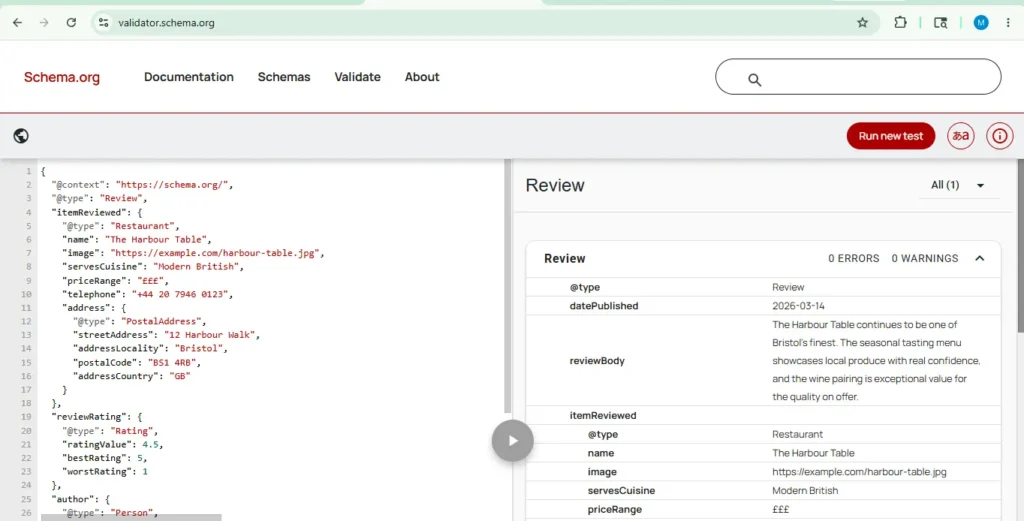
Example 1: Simple Standalone Review
A single critic review of a restaurant.
					<script type="application/ld+json">
{
  "@context": "https://schema.org/",
  "@type": "Review",
  "itemReviewed": {
    "@type": "Restaurant",
    "name": "The Harbour Table",
    "image": "https://example.com/harbour-table.jpg",
    "servesCuisine": "Modern British",
    "priceRange": "£££",
    "telephone": "+44 20 7946 0123",
    "address": {
      "@type": "PostalAddress",
      "streetAddress": "12 Harbour Walk",
      "addressLocality": "Bristol",
      "postalCode": "BS1 4RB",
      "addressCountry": "GB"
    }
  },
  "reviewRating": {
    "@type": "Rating",
    "ratingValue": 4.5,
    "bestRating": 5,
    "worstRating": 1
  },
  "author": {
    "@type": "Person",
    "name": "Sarah Jennings"
  },
  "publisher": {
    "@type": "Organization",
    "name": "The Bristol Food Review"
  },
  "datePublished": "2026-03-14",
  "reviewBody": "The Harbour Table continues to be one of Bristol's finest. The seasonal tasting menu showcases local produce with real confidence, and the wine pairing is exceptional value for the quality on offer."
}
</script>
The Self-Serving Review Rule — The Most Important Guideline You Must Understand
This is the single most misunderstood aspect of Review Snippet schema, and getting it wrong can disqualify your entire site from review rich results. Read this section carefully.
The rule: If the entity being reviewed controls the reviews about itself, those pages using LocalBusiness or any other type of Organization structured data are ineligible for the star review feature.
What this means in plain terms: you cannot mark up reviews about your own business on your own website and expect those reviews to generate review rich results in Google. This applies whether the reviews are:
- Testimonials you’ve collected and published on your own site
- Google Business reviews embedded on your page via a widget
- Facebook reviews embedded via a third-party widget
- Any other format where your business is the subject and your website is the host
A business adding its own customer reviews to its own website and marking them up with LocalBusiness or Organization schema is the exact use case this guideline prohibits.
What IS eligible: A third-party review platform that collects and publishes user reviews about other businesses (not itself) is fully eligible. A restaurant review site, a hotel comparison platform, a software review aggregator — these all qualify because they are reviewing others, not themselves.
Who does this affect: If you run a local business and you’ve added a testimonials section to your homepage with review schema, those reviews will not generate star snippets. This is one of the most common structured data implementation errors seen in the wild. Remove the review schema from self-serving pages to avoid any potential guideline violation.
The correct alternative for local businesses: Ensure your Google Business Profile is well-maintained and actively collecting reviews. Those reviews appear in Google’s local results and Knowledge Panel through a separate mechanism that doesn’t require schema on your website.
Review Schema vs FAQPage Schema vs AggregateRating — Choosing the Right Type
There are several structured data types that involve user-generated or editorial opinions, and choosing the right one is important.
Review / AggregateRating — Use for genuine evaluative content about a specific item. One or more people giving a quality assessment and star rating. This is what generates the gold stars in search results.
FAQPage — Use for question-and-answer format content about your own products, services, or topics. FAQs are informational, not evaluative — they don’t involve ratings or assessments. Using FAQPage markup for review content, or vice versa, will produce validation errors.
EmployerAggregateRating — The dedicated subtype for reviews of companies as employers. If your site publishes user-generated ratings about organizations as places to work, use EmployerAggregateRating rather than generic AggregateRating — it makes your content eligible for the jobs enriched search experience specifically.
QAPage — Use for pages where a single question is asked and multiple user-submitted answers follow. This is not a review or rating format — it’s a community help format.
The most common confusion is between Review and FAQPage. If your content assigns a quality score to something, it’s Review. If your content asks and answers questions about something, it’s FAQPage.
Google's Technical Guidelines for Review Snippets
These are the non-negotiable requirements from Google’s structured data policy for review schema. Violating any of these can result in your pages losing rich result eligibility or receiving a manual action.
Review content must be visible on the page. The content you mark up in your Review or AggregateRating schema must be immediately obvious to users from the marked-up page. If you use AggregateRating, users should be able to see that aggregate rating on the page. Schema that describes content not present on the page is considered misleading.
Refer clearly to a specific product or service. Review markup must be about one specific, identifiable item — not a category, a collection, or a general topic. "Best laptops under £500" is not a valid itemReviewed. A specific laptop model is.
For multiple individual reviews, also include an aggregate rating. If your page has several individual Review objects, Google expects an AggregateRating to accompany them. A collection of reviews without a compiled score is considered incomplete markup.
Don’t aggregate reviews from other websites. You must only mark up reviews that are original to your site. Scraping reviews from Google, Amazon, Yelp, or other platforms and marking them up as your own violates both Google’s structured data policies and those platforms’ terms of service.
Author names must be genuine names. Reviewer names in the author field must be real personal or organisational names. Promotional text, job titles alone, or placeholder strings will cause the markup to fail validation and may result in a manual action.
Ratings must be sourced directly from users (for local business/org reviews). For local business and organisation review schema, ratings must come from real users — not editorial curation, not staff ratings, not algorithmically generated scores.
Common Review Schema Mistakes That Cause Rich Results to Disappear
Mistake 1: Using a Comma Instead of a Dot for Decimal Ratings "ratingValue": "4,4" is invalid. It must be "ratingValue": 4.4 (number) or "ratingValue": "4.4" (string with dot). Google’s validator accepts the comma format without always flagging it as an error, but the rating will be misinterpreted or ignored in rich results.
Mistake 2: Marking Up Self-Serving Reviews on Your Own Business Page As covered in the self-serving review section: this is the most common disqualifying mistake. If your business reviews its own products on its own site using LocalBusiness or Organization schema, those pages are explicitly ineligible.
Mistake 3: Including Individual Reviews Without an Aggregate Rating Multiple Review objects on a single page without an accompanying AggregateRating block. Google expects both if multiple reviews are present.
Mistake 4: Adding Review Schema to List or Category Pages Review schema should be on individual item pages, not on pages that list multiple items. A product category page showing 20 products shouldn’t have a single review schema block — each product’s individual page should have its own.
Mistake 5: Author Name Over 100 Characters The author.name field has a 100-character limit enforced by Google. Values longer than this make the page ineligible for author-based review snippets. Keep reviewer names concise.
Mistake 6: Using reviewRating When You Need ratingValue (in AggregateRating) Review uses reviewRating (containing a Rating object). AggregateRating uses ratingValue directly. These are different properties and mixing them up produces validation errors that can be hard to spot.
Mistake 7: Stale Review Counts If your review count is hardcoded in a static JSON-LD block and your site continues collecting reviews, your schema data will drift out of sync with your page content. Google compares declared schema against on-page data — a significant mismatch is a trust signal problem. Use dynamic schema generation for any page where review counts change.
Monitoring Review Snippet Rich Results in Search Console
After deploying your review schema, use Google Search Console to track implementation health and performance.
Navigate to Search Console → Rich Results and look for the Review Snippet report type. This shows you which pages have valid markup, which have errors or warnings, and how those pages are performing in terms of impressions and clicks from star-enhanced search results.
After deploying structured data for the first time, allow several days for Google to find and crawl your pages. Look for an increase in valid items and no increase in invalid items. If you see errors, fix them and use the URL Inspection tool to request recrawling of affected pages.
Use the Performance Report to track how often your pages appear as rich results, what position they appear at, and their click-through rates. This data lets you quantify the impact of your review schema implementation — the before-and-after comparison in CTR from review snippet implementation is often one of the most clearly measurable SEO wins available.
Frequently Asked Questions
What is a Review Snippet Schema Markup Generator?
A Review Snippet Schema Markup Generator is an online tool that converts your review or rating data into valid Review and AggregateRating JSON-LD structured data code. Instead of manually writing nested JSON-LD objects with the correct Schema.org properties, data types, and required fields, you fill in a form and the generator produces clean, validated output. Our generator supports all four review schema implementation patterns — simple standalone reviews, nested reviews, standalone aggregate ratings, and nested aggregate ratings — covering every use case from individual critic reviews to large-scale e-commerce product rating pages.
Which items can I add review schema to?
Google officially supports review snippets for: Books, Courses, Events, Local businesses (on third-party review sites only), Movies, Products, Recipes, and Software Applications. Additionally, the following Schema.org types are supported: CreativeWorkSeason, CreativeWorkSeries, Episode, Game, MediaObject, MusicPlaylist, MusicRecording, and Organization (on third-party review sites only). If your review content is about any item in this list, review schema is appropriate for your page.
Can I add review schema to my own business website?
For your own business’s products and services, yes — with an important caveat. Product review schema on an e-commerce store is fully eligible for rich results because you are marking up reviews of specific products, not reviews of your own business entity. What is NOT eligible is marking up reviews about your own business using LocalBusiness or Organization schema on your own website. If you run a restaurant, you cannot mark up your own customers’ testimonials on your homepage and expect star snippets to appear in branded search results. Google’s self-serving review guideline explicitly prohibits this.
Do I need both Review and AggregateRating on the same page?
Not always — it depends on your page content. If you have only individual reviews with no compiled score, use Review alone. If you have only an average rating with no individual review text, use AggregateRating alone. If your page shows both individual reviews and a compiled average (the most common pattern on e-commerce product pages), include both. When multiple individual reviews are present, Google expects an AggregateRating to accompany them.
What happens if I omit bestRating and worstRating?
If these fields are omitted, Google assumes a default scale of 1 to 5. This means if your actual scale is different — say you use a 10-point scale and your ratingValue is 7.2 — Google will display and interpret this as 7.2/5, which is clearly wrong. Always declare your scale boundaries when using anything other than the default 1–5 system. Even for standard 5-star systems, explicitly including bestRating: 5 and worstRating: 1 is better practice than relying on the default assumption.
How do I mark up reviews for a product on my WooCommerce or Shopify store?
For WooCommerce, the cleanest approach is to use a custom code snippet via WPCode that generates dynamic JSON-LD for each product page, pulling ratingValue, ratingCount, and reviewCount from WooCommerce’s product meta fields. Avoid relying on WooCommerce’s built-in schema output, which often omits recommended fields. For Shopify, edit your product.liquid template to inject a dynamically populated JSON-LD block using Liquid variables for rating data. Both approaches ensure your schema always reflects the current review state of each product.
What’s the difference between ratingCount and reviewCount?
ratingCount is the total number of individual numeric ratings — including ratings from users who left a star score but no written text. reviewCount is the number of users who left a written review (which may or may not include a numeric score). On platforms where every review includes both text and a score, these numbers will be identical. On platforms where users can leave star ratings without writing anything, ratingCount will typically be higher than reviewCount. At least one of these fields is required for AggregateRating. Including both, when both are tracked by your platform, provides the most complete data.
Can I add review schema if I only have one review?
Yes — a single review is valid for Review schema. For AggregateRating, a single rating is technically valid (ratingCount: 1), but from a user experience standpoint, an “aggregate” of one is misleading. Most review platforms set a minimum threshold (often 3–5 reviews) before displaying an aggregate score, and applying the same threshold before adding AggregateRating schema is good practice. There’s no Google-imposed minimum, but quality and credibility standards suggest waiting until you have a meaningful sample size.
How long does it take for review rich results to appear after adding schema?
There is no guaranteed timeline. Google needs to crawl your page, process the structured data, and decide whether the markup qualifies for rich result display. This process typically takes several days to several weeks, depending on your site’s crawl frequency and Google’s current processing queue. You can accelerate it by submitting the URL via the Google Search Console URL Inspection tool’s “Request Indexing” function after publishing your schema. Monitor the Rich Results status report in Search Console for confirmation that the markup has been processed and is valid.
Does review schema guarantee star ratings will appear in search results?
No — and this is an important distinction. Valid, correctly implemented review schema makes your page eligible for review rich results. Google states explicitly that it does not guarantee that features that consume structured data will show up in search results. Factors including your site’s overall quality, the relevance of the query, and how Google chooses to display results for that particular search all affect whether the stars appear. What structured data does guarantee is that without it, you have no chance of getting the stars at all.
Why Review Snippet Schema Has the Highest Visible Impact of Any Structured Data Type
Of all the rich result types available through structured data, review snippets are consistently cited as producing the most visually noticeable improvement to search result listings. Star ratings are a deeply ingrained trust signal — studies across e-commerce, hospitality, and software consistently show that users are more likely to click on and purchase from products and businesses with visible star ratings than those without them.
The structured data implementation is the gate between your reviews sitting invisibly in your page code and those same reviews appearing as gold stars in Google’s results — driving higher click-through rates, more qualified traffic, and ultimately more conversions.
The generator on this page produces output that meets every technical requirement from Google’s current specification: the correct property names, valid data types, proper bestRating/worstRating scale declarations, correctly structured nested objects, and ISO 8601 date formats. Every output passes Google’s Rich Results Test without modification.
That’s the gap this tool closes — between having review content on your site and having that content work visibly for you in search.
Review snippet structured data uses the Review type at schema.org/Review and the AggregateRating type at schema.org/AggregateRating. Google’s full implementation guidelines are published at developers.google.com/search/docs/appearance/structured-data/review-snippet (last updated December 10, 2025). All generator output conforms to Google’s current structured data specification.
Latest Updates — Review Snippet Schema Generator
This tool and its documentation are actively maintained to reflect the latest changes from Google Search Central and Schema.org. Below is a record of significant updates.
🗓️ May 2026 — Full Four-Pattern Implementation Support Added at Launch
This generator was built to address the most common gap in existing review schema tools: support for only one or two of the four valid implementation patterns for review and rating structured data.
What the generator supports at launch:
All four patterns defined in Google’s Review Snippet structured data specification are supported:
Pattern 1 — Simple Standalone Review: A single review with itemReviewed, reviewRating, author, optional datePublished, reviewBody, and publisher. Required fields enforced by the generator form.
Pattern 2 — Nested Review: A Review object structured for nesting inside a parent Product, Book, Recipe, or other supported type. The generator omits itemReviewed automatically in nested mode, as required by Google’s specification.
Pattern 3 — Standalone AggregateRating: A compiled rating block with itemReviewed, ratingValue, ratingCount/reviewCount, and bestRating/worstRating scale declarations.
Pattern 4 — Nested AggregateRating: An AggregateRating structured for nesting inside a Product, Book, or other parent type — the most common e-commerce implementation pattern.
The author.name 100-character limit enforced by Google’s specification is validated in real-time in the generator form, preventing a common mistake that silently disqualifies pages from author-based review snippets.
🗓️ December 2025 — Google Updates Review Snippet Documentation (Dec 10, 2025)
Google Search Central updated its official Review Snippet structured data documentation on December 10, 2025. Key points confirmed and clarified in this update:
Self-Serving Review Guideline Reinforced The December 2025 update explicitly restates that if the entity being reviewed controls the reviews about itself, pages using LocalBusiness or any Organization structured data are ineligible for the star review rich result feature. This applies to reviews embedded via third-party widgets (Google Business reviews, Facebook review widgets) as well as natively collected testimonials. This guideline has been in place since 2019 but continues to be the most widely violated rule in review schema implementations.
EmployerAggregateRating Redirect Confirmed The documentation confirms the redirect for employer review use cases: sites providing reviews about employers should use EmployerAggregateRating structured data rather than the generic Review/AggregateRating types. This creates a clear division between general review schema (this tool) and employer-specific rating schema.
Decimal Notation Requirement Confirmed Google’s December 2025 update reconfirms that decimal ratingValue fields must use a dot as the decimal separator (4.4) rather than a comma (4,4). In Microdata and RDFa, the content attribute can be used to satisfy this requirement while displaying a locale-appropriate format to users. This generator enforces dot notation in all JSON-LD output.
Reference: Google Review Snippet Structured Data — Last updated 2025-12-10
🗓️ September 2019 — Self-Serving Review Guideline Introduced (Historical Reference)
For context and transparency, the self-serving review guideline — one of the most important rules governing review schema implementation — was introduced in September 2019 via Google’s Search Central Blog. Prior to this update, businesses could mark up their own customer reviews with LocalBusiness schema and receive star snippets in branded search results.
Google introduced the restriction because self-serving reviews created a misleading signal in search results — businesses were marking up handpicked testimonials as if they were independent third-party assessments. The guideline change ensures that review rich results only appear when the reviewing entity is independent from the entity being reviewed.
This historical context is included here because understanding why the rule exists helps site owners understand which use cases are genuinely affected and which are not — and avoids overcorrection (mistakenly removing valid review schema from third-party review sites or product pages).
Reference: Google Search Blog — Making Review Rich Results More Helpful (September 2019)
Sources & References
This tool’s output and documentation are maintained in alignment with the following official resources:
- Google Review Snippet Structured Data — Google Search Central (Last updated: December 10, 2025)
- Schema.org/Review — Schema.org Official Specification
- Schema.org/AggregateRating — Schema.org Official Specification
- Google’s Blog on Self-Serving Reviews — Google Search Central Blog
- Google EmployerAggregateRating Guidelines — Google Search Central
- Google’s Structured Data General Guidelines — Google Search Central
Last reviewed by the iLoveSchema editorial team: May 2026