
Free Vehicle Listing Schema Markup Generator — Car & Vehicle JSON-LD Schema Generator (Schema.org)
If you run a car dealership website, an automotive marketplace, a used vehicle listing platform, or any site that publishes vehicle data online — structured data is one of the most powerful tools available to you. Not because it promises a specific Google rich result, but because it makes your vehicle data machine-readable for a search landscape that is increasingly driven by AI systems, answer engines, and platforms beyond Google’s blue links.
This free Vehicle Listing Schema Markup Generator creates valid, Schema.org V30.0 compliant JSON-LD for cars, trucks, motorcycles, and all vehicle types using the Car and Vehicle schema types. It covers the complete property set — make, model, year, mileage, fuel type, transmission, engine specification, VIN, body type, seating capacity, colour, pricing, and dozens more — producing clean, validated structured data your site can use today.
Before going further, there’s one piece of context worth stating clearly.
How To Use This Tool
Fill in the core vehicle information:
- Vehicle Name: Full name including year, make, model, trim
- Description: Detailed description with key selling points
- Brand & Model: Manufacturer brand and specific model
Complete the technical specifications:
- Engine & Transmission: Engine specs and transmission type
- Dimensions: Body type, doors, seating, fuel capacity
- Performance: Mileage, speed, fuel consumption, emissions
Add vehicle images and condition details:
- Multiple Images: Front, side, interior views as ImageObjects
- Condition: New, Used, or Refurbished
- History: Previous owners, purchase date, damages
Configure the offer details:
- Price & Currency: Set the vehicle price
- Seller Information: Dealership or seller details
- Return Policy: Add merchant return policy for trust signals
Generated Schema
Important Context: Google's Vehicle Listing Rich Result — What Changed and Why It Still Matters
In June 2025, Google announced it was phasing out several structured data rich result types as part of an ongoing simplification of its search results page. Vehicle listing was among the types retired — meaning Google no longer displays a dedicated vehicle listing rich result card in its search results. The official documentation for Google’s vehicle listing structured data was removed in September 2025.
This does not mean vehicle schema markup has no value. Here is what it does and doesn’t mean:
What it means: Google will no longer display a dedicated vehicle listing carousel or rich result card for pages with vehicle schema markup.
What it does not mean: The Schema.org Car and Vehicle types are not deprecated. They remain active, fully supported vocabulary in Schema.org V30.0 (March 19, 2026). Every property defined at schema.org/Vehicle and schema.org/Car is valid and in use across a wide range of platforms, AI systems, and automotive data pipelines.
Understanding this distinction is essential for making an informed decision about whether and how to implement vehicle schema on your site.
Who Still Benefits From Vehicle Schema Markup — and How
The retirement of one Google-specific rich result doesn’t change the fundamental value of making your vehicle data machine-readable. Here is where vehicle schema markup continues to deliver real, measurable value.
AI Search Platforms Are the Growing Opportunity
The most significant shift in automotive search in 2025–2026 is the rise of AI-powered answer engines. When a buyer asks ChatGPT Search, Perplexity, Microsoft Copilot, or Google’s AI Overviews “find me a used Ford Ranger under £15,000 within 30 miles of Leeds” — these platforms need machine-readable, structured vehicle data to answer confidently.
Automotive platforms that publish clean, attribute-rich vehicle schema are far more reliably indexed and referenced by AI systems than those relying on unstructured listing text. Properties like fuelType, mileageFromOdometer, vehicleTransmission, bodyType, vehicleSeatingCapacity, and offers (price) give AI platforms the entity data they need to match inventory to buyer queries without parsing paragraphs of marketing copy.
This is the highest-growth opportunity in automotive structured data right now, and it is completely independent of Google’s rich result features.
Microsoft Bing and Copilot Integration
Microsoft Bing actively uses Schema.org Car and Vehicle structured data for its automotive search features and its Copilot AI. Bing’s automotive search surfaces vehicle listings from dealer sites and marketplaces, and structured data is one of the primary signals it uses to understand and categorise vehicle inventory. For automotive businesses targeting UK, US, and European markets, Bing’s share of automotive search traffic — and Copilot’s growing role in car research — makes schema implementation a meaningful investment.
Automotive Data Pipelines and Aggregators
The Schema.org Vehicle vocabulary was developed in collaboration with the Automotive Ontology Working Group (automotive-ontology.org), a consortium of industry participants including major OEMs, data aggregators, and automotive software companies. This means the vocabulary is deeply integrated into automotive data ecosystems beyond search engines — inventory management systems, vehicle data APIs, classified ad platforms, and automotive AI services all read and process Schema.org vehicle data.
Implementing vehicle schema on your listings contributes structured data to these pipelines in a standardised, interoperable format.
Entity Recognition and Knowledge Graph Building
Google may no longer show a vehicle listing rich result, but it still indexes and processes Schema.org data for entity recognition. A vehicle listing page with complete Car schema — including vehicleIdentificationNumber (VIN), brand, model, modelDate, color, mileageFromOdometer, and offers — gives Google a precise entity record for that specific vehicle. This contributes to Google’s understanding of your site as an authoritative automotive data source, supports knowledge panel generation for your dealership or platform, and improves the accuracy of how your pages are indexed for organic automotive searches.
Voice Search for Automotive Queries
Voice search handles a meaningful portion of automotive research queries — hours of operation, stock availability, price ranges, and model-specific questions. Voice assistants pull from structured data when available, and the operational and inventory properties in vehicle schema (offers, priceRange, availability, vehicleSpecialUsage) are exactly the kind of data voice systems need to answer specific automotive questions confidently.
The Schema.org Car and Vehicle Inheritance Chain
Car sits at the end of a four-level inheritance chain that gives it one of the richest property sets of any Schema.org product type:
Thing > Product > Vehicle > Car
From Thing: name, description, image, url, identifier, sameAs, additionalType
From Product: brand, manufacturer, model, color, sku, mpn, offers (pricing via Offer), aggregateRating, review, hasCertification, additionalProperty, keywords
From Vehicle: The full automotive-specific property set — fuel type, mileage, engine specification, transmission, body type, seating capacity, number of doors, drive wheel configuration, VIN, emissions, and more (covered in detail below)
From Car: acrissCode (ACRISS car classification code for rental vehicles), roofLoad (permitted roof cargo weight)
This hierarchy means a single Car schema block can describe not just what a vehicle is but how it performs, what it costs, who makes it, what condition it’s in, what special usage history it has, and how to contact the seller — all in a single, coherent JSON-LD block.
The Complete Vehicle Schema Property Set — Explained
Core Identity Properties (from Product and Thing)
name — The full vehicle name as listed. For used vehicles: year, make, model, trim (e.g. “2021 Ford Ranger Wildtrak 2.0 EcoBlue”). For new vehicles: the official model name.
description — A full, honest description of the vehicle including its condition, service history, notable features, and any relevant context. 150–300 words is appropriate for AI systems to use when generating recommendations.
brand — The manufacturer brand as an Organization object with name and url. Linking to the manufacturer’s official website in brand.url helps search engines and AI systems match your listing to the correct brand entity.
manufacturer — The manufacturing organisation. For most passenger vehicles, brand and manufacturer refer to the same entity. For rebadged vehicles (e.g. Dacia vs Renault), they may differ.
model — The specific model name (e.g. “Ranger Wildtrak”). Use text or a ProductModel object.
color — The exterior colour of the vehicle as a text string. Use the manufacturer’s colour name where available.
sku — Your internal stock number or listing ID. This is the most useful identifier for matching schema data to your database records.
vehicleIdentificationNumber — The Vehicle Identification Number (VIN) — the unique 17-character serial number assigned to every motor vehicle. Including the VIN in your schema creates an unambiguous entity identifier that can be matched against vehicle history databases, manufacturer records, and automotive data registries. It is one of the most powerful entity signals available for vehicle listings.
offers — The price, using an Offer object with price, priceCurrency, availability, and priceValidUntil. This is the property that AI search platforms use to match vehicles to price-range queries.
Mileage and History Properties
mileageFromOdometer — The odometer reading, expressed as a QuantitativeValue with value and unitCode. Use KMT for kilometres or SMI for statute miles. This is one of the most searched-for vehicle attributes and should always be included.
numberOfPreviousOwners — The number of previous owners. A QuantitativeValue with unit code C62. High relevance for used vehicle searches.
dateVehicleFirstRegistered — The date the vehicle was first registered with public authorities. ISO 8601 date format (YYYY-MM-DD).
productionDate — The date the vehicle was manufactured. May differ from registration date by several months for dealer stock.
purchaseDate — The date the current owner purchased the vehicle.
knownVehicleDamages — A text description of known damage — both repaired and unrepaired. Including this builds trust with buyers and complies with disclosure requirements in many jurisdictions. It also signals data completeness to AI systems.
vehicleSpecialUsage — Whether the vehicle has been used for special purposes. Accepts CarUsageType values including DrivingSchoolVehicle, RentalVehicle, and TaxiVehicle, or free text. Many countries legally require this disclosure when selling a vehicle — including it in schema ensures the information is machine-readable across all data channels.
Fuel and Engine Properties
fuelType — The fuel type: Petrol, Diesel, Electric, Hybrid (full/mild/plug-in), Hydrogen, LPG. Use Schema.org’s QualitativeValue enumeration or text. This is a primary filter for both search and AI queries.
fuelConsumption — Amount of fuel consumed per distance — typically litres per 100km. Use a QuantitativeValue with unitText set to "L/100 km".
fuelEfficiency — Distance per unit of fuel — typically miles per gallon or km per litre. The reciprocal of fuelConsumption. Include whichever is most relevant to your market.
fuelCapacity — Tank capacity (for combustion vehicles) or battery capacity (for EVs). Use LTR for litres or AMH for ampere-hours.
emissionsCO2 — CO2 emissions in grams per kilometre. A numeric value with no unit code (note: there is no UN/CEFACT code for g/km — add the unit as text in the value’s name property). Increasingly important for markets with emissions-based vehicle taxation and buyer research.
meetsEmissionStandard — The emissions standard the vehicle meets. For European vehicles: Euro 5, Euro 6, Euro 6d-TEMP, Euro 6d. For US vehicles: EPA Tier 2, CARB LEV III. Use text or the Schema.org QualitativeValue type.
vehicleEngine — Engine specification as an EngineSpecification object with name (e.g. “2.0 litre turbocharged petrol inline-4”), engineDisplacement, enginePower, and engineType.
Transmission and Drive Properties
vehicleTransmission — Transmission type: Manual, Automatic, Semi-Automatic, DCT (Dual Clutch Transmission), CVT. Use text or QualitativeValue.
driveWheelConfiguration — Which wheels receive torque: FrontWheelDriveConfiguration, RearWheelDriveConfiguration, AllWheelDriveConfiguration, FourWheelDriveConfiguration. Schema.org provides DriveWheelConfigurationValue enumeration values for all four.
numberOfForwardGears — The number of forward gears (e.g. 6, 7, 8, 10 for automatic). Use an integer or QuantitativeValue with unit C62.
accelerationTime — 0–60 mph or 0–100 km/h time in seconds, as a QuantitativeValue with unit SEC. The reference speed should be noted in the value’s name property.
speed — Top speed range as a QuantitativeValue with unit KMH (kilometres per hour) or HM (miles per hour). Use minValue and maxValue for ranges.
Body and Dimensions
bodyType — Vehicle body style: Saloon/Sedan, Hatchback, Estate/Wagon, SUV/Crossover, Coupe, Convertible, Van, Pickup Truck, Minivan. Use text or QualitativeValue.
numberOfDoors — Number of doors as integer or QuantitativeValue.
vehicleSeatingCapacity or seatingCapacity — Number of passengers the vehicle can legally and physically seat.
numberOfAirbags — Number of airbags in the vehicle.
cargoVolume — Boot/trunk volume in litres, as QuantitativeValue with unit LTR. Key for estate car, SUV, and van searches.
wheelbase — Distance between front and rear axle centres, in centimetres or millimetres.
weightTotal — Gross vehicle weight (GVW) — total permitted weight including passengers, cargo, and the empty vehicle.
payload — Permitted weight of passengers and cargo, excluding the empty vehicle weight.
trailerWeight — Permitted towed trailer weight — one of the most searched-for attributes for SUV, pickup, and estate car buyers.
tongueWeight — Permitted vertical tongue/ball weight of a towed trailer (TWR/TLR/VLR).
Interior and Features
vehicleInteriorColor — Interior colour description.
vehicleInteriorType — Interior material type: leather, alcantara, fabric, synthetic, wood trim, etc.
vehicleConfiguration — A short text description of the full vehicle specification — e.g. “5dr hatchback ST 2.5 MT 225 hp” or “Limited Edition Platinum Pack”. This is the catch-all field for configuration details not covered by specific properties.
steeringPosition — Left-hand drive (LeftHandDriving) or right-hand drive (RightHandDriving). Critical for international vehicle markets.
numberOfAxles — Number of axles. Primarily relevant for commercial vehicles.
roofLoad (Car-specific) — Maximum permitted weight of cargo and rack installations on the vehicle roof.
acrissCode (Car-specific) — The ACRISS Car Classification Code used by car rental companies. Relevant for rental fleet and car hire platforms.
How to Use the Vehicle Schema Markup Generator
Step 1: Select Vehicle Type Choose Car for passenger cars and most personal vehicles. Car is the most specific and well-supported subtype for automotive listings. The parent Vehicle type can be used for commercial vehicles, motorcycles, and types not covered by Car.
Step 2: Enter Identity Fields Fill in name (full vehicle name with year, make, model, trim), description (comprehensive listing description), brand, manufacturer, model, and color.
Step 3: Add the VIN Enter the vehicleIdentificationNumber if available. This is the most powerful entity identifier for vehicle schema and should always be included for used vehicle listings.
Step 4: Add Mileage and History Fill in mileageFromOdometer with unit (km or miles), numberOfPreviousOwners, dateVehicleFirstRegistered, and vehicleSpecialUsage if applicable. For any known damage, add knownVehicleDamages.
Step 5: Add Technical Specifications Enter fuelType, vehicleTransmission, driveWheelConfiguration, bodyType, numberOfDoors, vehicleSeatingCapacity, numberOfForwardGears, emissionsCO2, and meetsEmissionStandard.
Step 6: Add Engine Data Use the vehicleEngine builder to add engine name, displacement, power, and type.
Step 7: Add Pricing Use the offers property to add price, priceCurrency, availability (InStock, OutOfStock, PreOrder), and priceValidUntil.
Step 8: Add Images Add the image URL — the primary photo of the vehicle. Multiple images can be added as an array.
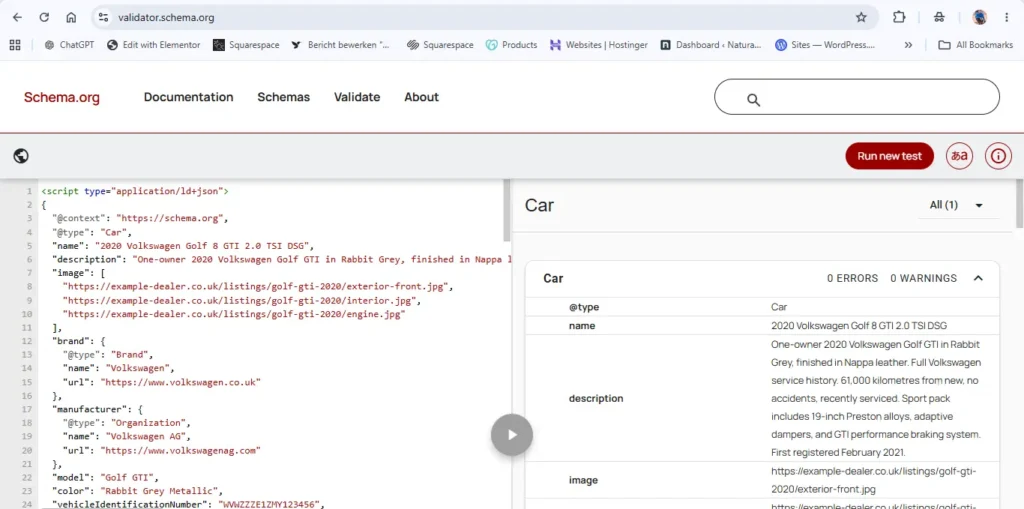
Step 9: Generate, Validate, Implement Click Generate. Copy the JSON-LD. Validate at validator.schema.org. Add to your vehicle listing page’s <head>.
How to Add Vehicle Schema to Your Website
Vehicle schema should be placed on the individual vehicle listing page — not your homepage, not a category page. Each vehicle gets its own schema block on its own page.
Custom Dealer Management Systems (DMS) and Inventory Platforms
For platforms managing hundreds or thousands of listings, generate vehicle schema server-side from your inventory database. Dynamically populate every relevant field from your existing data model — make, model, year, mileage, fuel type, transmission, VIN, price — and inject the JSON-LD into each listing page’s <head>. This ensures schema stays current as inventory changes.
WordPress Dealer Sites
Use WPCode to inject custom JSON-LD on individual listing pages or vehicle custom post types. For dealer sites using plugins like WP-Lister, Dealer Inspire, or CarDealerPress, these platforms may have their own schema output — supplement it with custom JSON-LD for properties they don’t cover.
Marketplace Platforms (Autotrader-style)
For marketplace platforms hosting many sellers’ inventory, schema should be generated dynamically at the listing level from submitted vehicle data. Each listing URL should have unique schema reflecting that specific vehicle’s attributes.
Squarespace, Wix, and Website Builders
For smaller single-dealership sites on website builders, use per-page code injection to add schema to each listing page individually. For sites with more than 20–30 listings, this approach doesn’t scale — consider a developer-built solution.
Complete Vehicle Schema Markup Example — Full JSON-LD
A production-ready Car schema block for a used vehicle listing — exactly what this generator produces.
					<script type="application/ld+json">
{
  "@context": "https://schema.org",
  "@type": "Car",
  "name": "2020 Volkswagen Golf 8 GTI 2.0 TSI DSG",
  "description": "One-owner 2020 Volkswagen Golf GTI in Rabbit Grey, finished in Nappa leather. Full Volkswagen service history. 61,000 kilometres from new, no accidents, recently serviced. Sport pack includes 19-inch Preston alloys, adaptive dampers, and GTI performance braking system. First registered February 2021.",
  "image": [
    "https://example-dealer.co.uk/listings/golf-gti-2020/exterior-front.jpg",
    "https://example-dealer.co.uk/listings/golf-gti-2020/interior.jpg",
    "https://example-dealer.co.uk/listings/golf-gti-2020/engine.jpg"
  ],
  "brand": {
    "@type": "Brand",
    "name": "Volkswagen",
    "url": "https://www.volkswagen.co.uk"
  },
  "manufacturer": {
    "@type": "Organization",
    "name": "Volkswagen AG",
    "url": "https://www.volkswagenag.com"
  },
  "model": "Golf GTI",
  "color": "Rabbit Grey Metallic",
  "vehicleIdentificationNumber": "WVWZZZE1ZMY123456",
  "vehicleModelDate": "2020",
  "dateVehicleFirstRegistered": "2021-02-15",
  "productionDate": "2020-11-12",
  "bodyType": "Hatchback",
  "numberOfDoors": 5,
  "vehicleSeatingCapacity": 5,
  "numberOfForwardGears": 7,
  "vehicleTransmission": "Automatic (7-speed DSG)",
  "driveWheelConfiguration": "https://schema.org/FrontWheelDriveConfiguration",
  "fuelType": "Petrol",
  "emissionsCO2": 158,
  "meetsEmissionStandard": "Euro 6d",
  "vehicleInteriorColor": "Black/Red Nappa Leather",
  "vehicleInteriorType": "Nappa Leather",
  "vehicleConfiguration": "5dr hatchback GTI 2.0 TSI 245 hp DSG FWD Sport Pack",
  "steeringPosition": "https://schema.org/LeftHandDriving",
  "vehicleEngine": {
    "@type": "EngineSpecification",
    "name": "2.0 TSI turbocharged petrol inline-4",
    "engineDisplacement": {
      "@type": "QuantitativeValue",
      "value": 1984,
      "unitCode": "CMQ",
      "unitText": "cc"
    },
    "enginePower": {
      "@type": "QuantitativeValue",
      "value": 245,
      "unitCode": "BHP",
      "unitText": "bhp"
    }
  },
  "fuelConsumption": {
    "@type": "QuantitativeValue",
    "value": 7.1,
    "unitText": "L/100 km"
  },
  "fuelEfficiency": {
    "@type": "QuantitativeValue",
    "value": 39.8,
    "unitText": "mpg"
  },
  "accelerationTime": {
    "@type": "QuantitativeValue",
    "value": 6.2,
    "unitCode": "SEC",
    "name": "0–100 km/h"
  },
  "speed": {
    "@type": "QuantitativeValue",
    "maxValue": 250,
    "unitCode": "KMH",
    "unitText": "km/h"
  },
  "mileageFromOdometer": {
    "@type": "QuantitativeValue",
    "value": 61000,
    "unitCode": "KMT",
    "unitText": "km"
  },
  "numberOfPreviousOwners": {
    "@type": "QuantitativeValue",
    "value": 1,
    "unitCode": "C62"
  },
  "knownVehicleDamages": "None. No accident history. Full service history with Volkswagen main dealer.",
  "vehicleSpecialUsage": "No special usage. Personal vehicle only.",
  "cargoVolume": {
    "@type": "QuantitativeValue",
    "value": 381,
    "unitCode": "LTR",
    "unitText": "litres"
  },
  "numberOfAirbags": 8,
  "offers": {
    "@type": "Offer",
    "price": 28950,
    "priceCurrency": "GBP",
    "availability": "https://schema.org/InStock",
    "priceValidUntil": "2026-08-31",
    "url": "https://example-dealer.co.uk/listings/golf-gti-2020",
    "seller": {
      "@type": "AutoDealer",
      "name": "Riverside Volkswagen",
      "url": "https://example-dealer.co.uk",
      "telephone": "+44 117 000 1234",
      "address": {
        "@type": "PostalAddress",
        "streetAddress": "12 Riverside Road",
        "addressLocality": "Bristol",
        "postalCode": "BS1 5RW",
        "addressCountry": "GB"
      }
    }
  }
}
</script>
This example demonstrates the depth of data that the Schema.org Car type can express — 30+ properties covering every aspect of the vehicle’s identity, technical specification, history, and purchase information. AI platforms and automotive data consumers can parse this single block to answer questions about this specific vehicle with high confidence.
Vehicle Schema and AI Search — The Practical Opportunity for Dealers
The shift from Google-specific rich results to AI-driven search represents both a disruption and an opportunity for automotive businesses. Here’s the practical picture for dealers and marketplaces thinking about schema in 2026.
The buyer journey is increasingly AI-assisted. Car buyers are now asking AI assistants to help them find, compare, and evaluate vehicles before they ever visit a dealership or marketplace. Queries like “best SUV under £25,000 with towing capacity over 2,000kg” or “fuel-efficient hatchbacks under 100g/km CO2 in stock near Birmingham” are being processed by AI platforms that need structured, attribute-rich data to answer accurately.
Dealers with schema win the AI search moment. When AI platforms like Perplexity or Copilot compare vehicle options, they draw on whatever structured data is available. A listing with fuelConsumption, trailerWeight, bodyType, emissionsCO2, and offers.price all declared in machine-readable schema gives the AI system exactly what it needs to include that vehicle in a relevant comparison. A listing with only unstructured HTML text may be ignored entirely.
VIN is the key to entity matching. The vehicleIdentificationNumber property creates a unique, verifiable entity identifier that connects your listing to the vehicle’s history, specification database, and any other online records for that specific vehicle. AI systems that process multiple data sources about a vehicle use the VIN as the primary disambiguation key — dealers who include VINs in their schema create linkable, trustworthy data records that strengthen their authority as an automotive data source.
Vehicle vs Car — When to Use Which
Car — Use for passenger vehicles including saloons, hatchbacks, estates, SUVs, crossovers, coupes, convertibles, and most personal vehicles. Car is the most specific and data-rich subtype. If the vehicle would typically be described as a “car”, use Car.
Vehicle — Use for commercial vehicles (vans, trucks, HGVs), motorcycles, buses, agricultural vehicles, and any vehicle type that doesn’t fit the personal passenger car category. Vehicle is the parent type and is appropriate when a more specific subtype doesn’t exist.
For the majority of automotive dealer and marketplace use cases, Car is the correct type. It has full access to all Vehicle properties plus the Car-specific acrissCode and roofLoad properties.
Common Vehicle Schema Implementation Mistakes
Mistake 1: Generating Schema and Never Updating It Vehicle listings change — prices reduce, mileage updates when a car is used for demonstrations, availability changes when a car sells. If your vehicle schema is hardcoded in static HTML, it will become stale. Implement schema generation server-side from your live inventory database to ensure declared data always reflects current reality.
Mistake 2: Omitting the VIN The VIN is the most powerful entity identifier in vehicle schema and the one most commonly omitted. It connects your listing to a globally unique vehicle record. Always include it for used vehicle listings where the VIN is known.
Mistake 3: Omitting offers Pricing A vehicle listing schema without pricing is significantly less useful to AI search platforms that answer price-range queries. Always include the offers block with price, priceCurrency, and availability.
Mistake 4: Using Text Instead of Structured Values for Measurements "mileageFromOdometer": "61,000 km" is less reliable than the full QuantitativeValue object with value: 61000 and unitCode: "KMT". AI systems and data consumers can mathematically process structured values; they have to parse and interpret text strings. Use QuantitativeValue for all numeric measurements.
Mistake 5: Misusing emissionsCO2 This property expects a number (grams per km) — not a text string including units. Write "emissionsCO2": 158 not "emissionsCO2": "158 g/km". The unit context (g/km) should be noted in accompanying text if needed, not in the property value itself.
Mistake 6: Conflating brand with manufacturer For most vehicles these are the same entity. But for badge-engineered vehicles — where a manufacturer produces a model sold under multiple brand names — they differ. A Dacia Duster is manufactured by Renault Group but sold under the Dacia brand. Correctly separating these provides more accurate entity data.
Frequently Asked Questions
What is a Vehicle Listing Schema Markup Generator?
A Vehicle Listing Schema Markup Generator is a free online tool that converts your vehicle inventory data into valid Car and Vehicle JSON-LD structured data. Instead of hand-writing the nested Schema.org JSON-LD with correct QuantitativeValue objects, EngineSpecification blocks, DriveWheelConfigurationValue enumeration values, and Offer pricing structures, you fill in a form and the generator produces clean, validated output. Our generator implements the complete Schema.org V30.0 Car type property set — covering every automotive attribute from VIN and mileage to CO2 emissions, towing capacity, and ACRISS codes.
Does vehicle schema still work in Google Search?
Google retired its dedicated vehicle listing rich result feature in September 2025 as part of its search results simplification effort. Pages with vehicle schema markup will no longer display a dedicated vehicle listing rich result card in Google Search. However, the Schema.org Car and Vehicle types remain fully valid vocabulary — Google still processes the structured data for entity recognition, and the markup continues to provide value for AI search platforms, Bing, voice search, and automotive data ecosystems.
What value does vehicle schema provide now that Google’s rich result is deprecated?
Significant value across several channels. AI search platforms (ChatGPT Search, Perplexity, Bing Copilot) use schema data to answer vehicle-specific queries and comparisons. Microsoft Bing uses vehicle schema for its automotive search features. Voice assistants use schema data for specific vehicle queries. The automotive ontology community and data aggregators use Schema.org vehicle data. And entity recognition — Google understanding your dealership as an authoritative automotive data source — continues to benefit from complete, accurate vehicle schema.
What is the vehicleIdentificationNumber and why is it important?
The Vehicle Identification Number (VIN) is a standardised 17-character serial number that uniquely identifies every motor vehicle manufactured after 1981. In vehicle schema, the vehicleIdentificationNumber property creates an unambiguous entity identifier that connects your listing to the specific vehicle’s global record — cross-referenceable with manufacturer databases, vehicle history services (HPI, Carfax, AutoCheck), and automotive data registries. Including the VIN in your schema is the single most powerful signal you can provide for entity recognition and AI platform matching.
How should I format the mileageFromOdometer property?
Use a QuantitativeValue object: "mileageFromOdometer": {"@type": "QuantitativeValue", "value": 61000, "unitCode": "KMT"} for kilometres, or "unitCode": "SMI" for statute miles. The unit codes come from the UN/CEFACT Common Code standard. Our generator handles this formatting automatically — you just enter the number and select the unit.
Can I use vehicle schema for new car listings as well as used?
Yes. For new vehicle listings, omit mileageFromOdometer, numberOfPreviousOwners, dateVehicleFirstRegistered, knownVehicleDamages, and vehicleSpecialUsage — these are used vehicle properties. For new vehicles, include productionDate, modelDate, fuelType, vehicleTransmission, bodyType, vehicleSeatingCapacity, emissionsCO2, meetsEmissionStandard, and the full offers block with availability set to InStock or PreOrder as appropriate.
How many vehicle listings should have schema markup?
All of them. Every individual vehicle listing page on your site is a candidate for its own unique Car schema block. Comprehensive schema coverage across your full inventory maximises AI search platform indexability and ensures every vehicle in your catalogue is represented as a structured entity. For large inventories, implement schema generation programmatically from your DMS database rather than manually.
Does vehicle schema help with voice search for automotive queries?
Yes. Voice assistants use structured data to answer specific factual queries — “Is the Golf GTI at Riverside VW still available?”, “What’s the fuel consumption on the 2020 Golf GTI?”, “How much is the grey VW Golf at your dealership?”. The offers, name, fuelConsumption, and availability properties are particularly valuable for voice query responses. Dealerships with complete vehicle schema are more reliably served in voice search results than those with unstructured listing text.
Why Automotive Structured Data Matters More in the AI Era
The retirement of Google’s vehicle listing rich result is not the end of structured data for the automotive industry. It’s the beginning of a more important phase.
In the era of generic blue links, rich results were the primary reason to add structured data — the star, the price, the vehicle card in the search result. In the era of AI search, structured data serves a deeper purpose: it makes your inventory legible to intelligent systems that are increasingly making the first cut in the car-buying research process.
A buyer who asks an AI assistant to help them find their next car is not browsing ten pages of search results. They’re asking for a structured, intelligent answer — and the dealers and platforms whose vehicle data is cleanly structured, attribute-rich, and machine-readable are the ones that get recommended, compared, and clicked.
That is what this generator is built to help you achieve. Not one specific Google feature. A structurally sound, AI-readable, cross-platform vehicle data record for every listing you publish.
Car is defined at schema.org/Car. Vehicle is defined at schema.org/Vehicle. Both are part of the inheritance chain Thing > Product > Vehicle > Car. Schema.org V30.0 (March 19, 2026). The Vehicle vocabulary was developed in collaboration with the Automotive Ontology Working Group (automotive-ontology.org). Google’s vehicle listing rich result was deprecated in September 2025 as documented at developers.google.com/search/updates.
Latest Updates — Vehicle Listing Schema Generator
This tool and its documentation are actively maintained to reflect the latest changes from Schema.org, Google Search Central, and the automotive structured data ecosystem. Below is a record of significant updates.
🗓️ May 2026 — Generator Launched with Full Schema.org V30.0 Car Type Support
This generator was built in response to a need that remained unmet after Google’s retirement of its dedicated vehicle listing rich result: a comprehensive, honest tool for generating Schema.org Car and Vehicle structured data that reflects the full power of the automotive vocabulary — not just the minimum fields required by a now-deprecated Google feature.
The deprecation context: In June 2025, Google announced plans to retire its vehicle listing rich result as part of its ongoing simplification of Google Search. In September 2025, Google removed the documentation for vehicle listing structured data, confirming the feature was no longer shown in Google Search results. This generator’s content and tooling are transparent about this change while positioning the continued value of Schema.org Car and Vehicle markup for the channels where it still actively matters.
What the generator supports at launch — built from Schema.org V30.0 (March 19, 2026):
The full Car type inheritance chain across four levels: Thing > Product > Vehicle > Car.
Car-specific properties: acrissCode (ACRISS rental classification), roofLoad (permitted roof cargo).
Vehicle-specific properties (full set): vehicleIdentificationNumber (VIN), mileageFromOdometer, numberOfPreviousOwners, dateVehicleFirstRegistered, productionDate, purchaseDate, knownVehicleDamages, vehicleSpecialUsage, fuelType, fuelConsumption, fuelEfficiency, fuelCapacity, vehicleEngine (EngineSpecification), emissionsCO2, meetsEmissionStandard, vehicleTransmission, driveWheelConfiguration, accelerationTime, speed, bodyType, numberOfDoors, vehicleSeatingCapacity, seatingCapacity, numberOfAxles, numberOfAirbags, numberOfForwardGears, cargoVolume, payload, trailerWeight, tongueWeight, weightTotal, wheelbase, vehicleInteriorColor, vehicleInteriorType, vehicleConfiguration, vehicleModelDate, modelDate, steeringPosition, callSign.
Product-level properties: brand, manufacturer, model, color, sku, mpn, offers (full Offer block with price, currency, availability, priceValidUntil, seller), aggregateRating, hasCertification, additionalProperty, keywords.
Correct QuantitativeValue formatting for all measurements — the generator produces structured value objects with value, unitCode, and unitText for all numeric fields, not plain text strings.
🗓️ September 2025 — Google Removes Vehicle Listing Rich Result Documentation
What changed:
Google removed the vehicle listing structured data documentation from Google Search Central in September 2025, confirming that the dedicated vehicle listing rich result is no longer shown in Google Search results. This followed Google’s June 2025 announcement that several rich result types were being phased out as part of its search results simplification initiative.
What this means for users of this tool:
The Schema.org Car and Vehicle types are not affected by this change. Schema.org V30.0 (released March 19, 2026) confirms both types as active, maintained vocabulary. The value of vehicle schema markup has shifted from Google-specific rich results toward AI search platform indexability, Bing automotive features, voice search, and automotive data ecosystem integration — all of which this generator’s output directly supports.
Practical guidance for existing implementations:
If your site has vehicle structured data that was implemented for Google’s now-deprecated vehicle listing rich result, there is no need to remove it. The schema is still valid and still provides value across other channels. However, review your implementation against the full Schema.org V30.0 Car specification — many implementations created for the Google feature used a narrow subset of properties and would benefit from expansion to cover the full automotive vocabulary.
Reference: Google Search Simplification Blog Post (June 2025) | Google Documentation Updates (September 2025)
🗓️ March 2026 — Schema.org V30.0 Confirms Car and Vehicle Type Stability
Schema.org released version 30.0 on March 19, 2026. The Car and Vehicle types were confirmed as stable in this release, along with all subordinate types including EngineSpecification, DriveWheelConfigurationValue, SteeringPositionValue, and CarUsageType.
V30.0 vehicleSpecialUsage clarification: The vehicleSpecialUsage property accepts both CarUsageType enumeration values (DrivingSchoolVehicle, RentalVehicle, TaxiVehicle) and free text. The enumeration values are preferred for machine-readable applications; free text is acceptable for descriptive information that doesn’t fit the enumeration.
Automotive Ontology Working Group acknowledgement confirmed: V30.0 maintains the acknowledgement of the Automotive Ontology Working Group (automotive-ontology.org) as contributors to the Vehicle and Car type development. This confirms the vocabulary’s grounding in automotive industry standards rather than being a purely search-engine-driven construct.
Reference: Schema.org/Car — V30.0, 2026-03-19 | Schema.org/Vehicle — V30.0, 2026-03-19
Sources & References
This tool’s output and documentation are maintained in alignment with the following official resources:
- Schema.org/Car — Schema.org V30.0 (March 19, 2026)
- Schema.org/Vehicle — Schema.org V30.0 (March 19, 2026)
- Schema.org/EngineSpecification — Schema.org Official Specification
- Google Search Simplification Blog Post — Google Search Central (June 2025)
- Google Documentation Updates — September 2025 — Vehicle Listing Deprecation
- Automotive Ontology Working Group — Vehicle vocabulary contributors
- Schema Markup Validator — Schema.org
Last reviewed by the iLoveSchema editorial team: May 2026