
Free HowTo Schema Markup Generator Online — Step-by-Step Instructions JSON-LD
Almost every blog, tutorial website, DIY platform, recipe creator, software documentation page, and how-to guide published online has one thing in common: it explains how to do something, step by step.
That content — the step-by-step instructions that help people accomplish real tasks — is exactly what HowTo schema markup was designed to structure. And when it’s implemented correctly, Google doesn’t just index your tutorial. It can surface your steps directly in search results, complete with time estimates, cost information, tools needed, and individual step images — all without the user needing to click through to your page first.
This free HowTo Schema Markup Generator creates valid, Schema.org V30.0 compliant JSON-LD for your how-to content in seconds. Whether your instructions cover changing a tyre, installing software, building a piece of furniture, cooking a recipe from scratch, applying a skincare routine, or writing a business plan — this generator handles every use case, from the simplest single-step list to complex sectioned procedures with tools, supplies, timing, and cost data.
No developer. No plugin. No prior knowledge of JSON-LD syntax required. Enter your instructions, generate your schema, validate it, and paste it into your page. Done.
How To Use This Tool
Fill in the basic information about your how-to guide:
- Guide Name: The title of your how-to
- Description: What the guide teaches
- Estimated Cost & Time: Optional but recommended
List all tools and supplies needed. Add images for visual reference.
Create unlimited sections, steps, directions, and tips:
- Section: Groups related steps (e.g., "Preparation")
- Step: Individual step within a section
- Direction: Specific instruction with optional media
- Tip: Helpful advice for that direction
HowTo schema can show as a rich result in Google with step-by-step visuals. Add the script to your how-to page.
Generated Schema
What Is HowTo Schema Markup?
According to Schema.org, HowTo is defined as: instructions that explain how to achieve a result by performing a sequence of steps.
In structured data terms, HowTo is a schema type that describes an instructional piece of content — a tutorial, guide, recipe, or procedure — to search engines and AI platforms in a machine-readable format. It sits in the inheritance chain Thing > CreativeWork > HowTo, meaning it inherits all the rich properties of a creative work (author, publication date, images, video, language, ratings) while adding a specialised set of properties unique to instructional content.
Those unique properties are where HowTo schema becomes genuinely powerful:
step — The core of the schema. Each step in your instructions is a structured object with position, text, images, and optional tips. Steps can be flat (a simple numbered list) or organised into sections (grouped phases of a complex procedure).
tool — Items used during the procedure but not consumed by it. A drill used to assemble furniture. A brush used to apply paint. These are HowToTool objects.
supply — Items consumed during the procedure. Wood screws used up in furniture assembly. Paint applied to a wall. These are HowToSupply objects.
totalTime, prepTime, performTime — Duration fields in ISO 8601 format that tell Google (and users) how long the task takes in total, how long preparation takes, and how long the actual performance takes.
estimatedCost — The approximate cost of the supplies used in the procedure, expressed as a MonetaryAmount or text string.
yield — What the completed procedure produces. For a recipe this might be “serves 4”. For a DIY project it might be “one assembled bookcase”. For a tutorial it might be “a fully configured development environment”.
These properties collectively allow Google to present your how-to content in a structured, informative rich result — one that competes directly with video thumbnails and featured snippets in capturing user attention before any click happens.
The Five-Object HowTo Ecosystem — Understanding the Full Structure
HowTo schema isn’t a single flat object. It’s a five-object ecosystem, and understanding how all five fit together is what separates a minimal implementation from one that produces rich, fully-featured search results.
1. HowTo — The Parent Container
The top-level object. Contains the title, description, total time, cost, tools, supplies, and the array of steps or sections. Every other object lives inside this container.
2. HowToSection — Grouping Steps into Phases
Optional but powerful. When your instructions have distinct phases — Preparation, Assembly, Finishing — a HowToSection groups the relevant steps under a named phase. Each section has a name and a position, and contains its own itemListElement array of HowToStep objects. Using sections is particularly valuable for complex procedures where users need to understand which phase they’re in.
3. HowToStep — The Individual Action Unit
Each discrete action the user must perform is a HowToStep. Each step has a position (its order in the sequence), and contains one or more HowToDirection or HowToTip objects in its itemListElement array.
4. HowToDirection — The Instruction Text
The actual instruction — what to do. This is the content the user follows. A HowToDirection has text (the instruction), and optionally beforeMedia, duringMedia, or afterMedia for images showing the state before the action, during it, or after it’s complete.
5. HowToTip — Contextual Guidance
A supporting note within a step — a clarification, warning, or helpful context that isn’t itself a direction but helps the user execute the step correctly. For example, after the direction “Tighten the lug nuts by hand”, a tip might say “Don’t use the wrench yet — overtightening at this stage can damage the wheel.”
The key hierarchy:
					HowTo
  ├── tool (HowToTool[])
  ├── supply (HowToSupply[])
  └── step (HowToSection[] or HowToStep[])
        └── HowToSection (optional grouping)
              └── itemListElement (HowToStep[])
                    └── itemListElement (HowToDirection[], HowToTip[])
Understanding this hierarchy is what allows the generator to produce both simple flat instruction lists and sophisticated sectioned procedures with the same underlying structure.
Who Needs HowTo Schema Markup?
HowTo is one of the broadest-application schema types in existence. If your website publishes instructional content of any kind, structured data is relevant to you.
DIY and Home Improvement Publishers — Tutorials for painting walls, fixing leaky taps, assembling flat-pack furniture, laying flooring, and hundreds of other household tasks. The tool and supply fields are especially valuable here — a list of required tools and materials in the search result is directly useful to someone planning a project.
Tech and Software Tutorial Sites — Step-by-step guides for installing software, configuring servers, setting up development environments, connecting APIs, or troubleshooting system issues. The step array with clear direction text helps Google surface the most relevant steps for technical queries.
Beauty, Wellness, and Grooming Content — Skincare routines, makeup tutorials, hair care procedures, nail art steps. The supply field is useful for listing products used. estimatedCost helps users understand whether a routine is budget-friendly.
Food and Cooking Platforms — Note that Recipe is technically a subtype of HowTo — but for non-recipe instructional food content (how to sharpen a knife, how to season a cast iron pan, how to make the perfect cup of pour-over coffee), the HowTo type is the correct choice. Standalone HowTo for food tutorials that aren’t traditional recipes produces different rich result formatting than Recipe schema.
Crafts, Art, and Making — Origami instructions, knitting patterns, woodworking guides, pottery tutorials. The yield field is particularly meaningful here — “one completed origami crane” or “one 12-inch wooden shelf bracket” tells users exactly what they’ll have at the end.
Educational and Learning Platforms — Study guides, skill-building tutorials, academic procedure explanations. HowTo schema can combine with educationalLevel and audience properties inherited from CreativeWork to target specific learning contexts.
Business Process and Professional Guides — How to write a business plan, how to register a company, how to conduct a performance review, how to set up a Google Analytics account. Professional and business tutorial content benefits from HowTo schema for the same reason all instructional content does — it makes the procedure machine-readable.
Health and Medical Information Sites — Step-by-step guides for health procedures (noting that medical content requires the highest standard of accuracy and editorial review). HowTo schema for health content should always be authored or reviewed by qualified practitioners.
How HowTo Schema Generates Rich Results in Google Search
When Google finds valid HowTo schema on a page, it may display the instructions as a rich result directly in search — showing the steps, images, timing, and cost information without the user needing to navigate to your site.
The visual format of the HowTo rich result typically includes the tutorial title, total time, estimated cost, a preview of the first few steps with any step images, and a “See all steps” expansion that shows more without a full page visit. On mobile, Google may display the full step-by-step breakdown in a swiping card format directly in the search result.
This placement is extremely valuable for instructional content because it serves the user’s immediate need — getting the instructions — while keeping your content visible as the authoritative source. Users who find the instructions useful are more likely to visit your site for related content, bookmark it, or share it.
The rich result is not guaranteed — Google decides whether to display it based on query context, schema validity, content quality, and the competitive landscape of the search results. But without the schema, the rich result is not possible at all. With it, your instructional content is in the pool of eligible candidates every time a relevant query is made.
Google Search and Voice Search
Voice assistants — Google Assistant, Siri, and others — actively use HowTo structured data to answer step-by-step query requests. When someone asks “Hey Google, how do I change a flat tyre?”, the answer can be read out step by step from your page’s structured data. Each step’s text value is what gets read aloud. Clear, concise, direct step text is both better for voice search and better for users.
AI Overview and AI Search Integration
Google’s AI Overviews, Perplexity, and ChatGPT Search increasingly pull structured instructional content when answering procedural questions. HowTo schema provides the cleanest, most reliably parseable format for this — better than trying to extract steps from unstructured body text. As AI search handles more “how do I…” queries, HowTo schema becomes an increasingly important signal for AI content discovery.
ISO 8601 Duration Format — The Time Fields Explained
The totalTime, prepTime, and performTime fields in HowTo schema use ISO 8601 duration format — a standardised way of expressing time periods. This format confuses many content creators who haven’t encountered it before, so here’s a plain-English guide.
The format starts with P (for Period), followed by time units:
PT30M= 30 minutesPT1H= 1 hourPT1H30M= 1 hour and 30 minutesPT2H45M= 2 hours and 45 minutesP1D= 1 dayP2DT3H= 2 days and 3 hours
The T separates date units (days: D) from time units (hours: H, minutes: M). You only need T if you’re specifying hours or minutes.
The three time fields and when to use each:
prepTime — Time spent before the main task begins. For cooking, this is chopping vegetables, marinating meat, preheating the oven. For DIY, this is gathering tools, measuring materials, clearing the workspace. For software setup, this is downloading installer files, backing up data.
performTime — Time spent actually doing the task — following the steps. For cooking, this is the cooking time. For DIY, this is the assembly time. For software, this is the actual installation process.
totalTime — The total from start to finish, including prep. Should equal prepTime + performTime if both are declared. If only one time field is used, use totalTime — it’s the most useful to both Google and users.
This generator validates your time inputs and automatically converts them to the correct ISO 8601 format. You enter 1 hour 30 minutes and the generator outputs PT1H30M.
HowToTool vs HowToSupply — The Most Overlooked Distinction
Many HowTo schema implementations either omit tools and supplies entirely or conflate the two. Getting this right materially improves the usefulness of your schema.
HowToTool — An object that is used during the procedure but not consumed by it. After the task is complete, the tool still exists and can be used again.
Examples: A drill. A mixing bowl. A paint brush. A level. A knife. A computer. A measuring tape. Scissors.
HowToSupply — An object that is consumed or used up during the procedure. After the task is complete, the supply is gone.
Examples: Wood screws. Paint. Cooking oil. Sand paper. Flares. Thread. Adhesive. Coffee beans.
Why it matters: Users reading a search result showing your how-to need to know what to buy (supplies) and what to already own or borrow (tools) before they start. Correctly categorising these helps users prepare more accurately, reduces abandonment when they discover mid-task that they’re missing something, and signals to Google that your content is thoughtfully structured.
Both HowToTool and HowToSupply can include an optional image property — a photograph of the tool or supply that can appear in the rich result alongside the step preview. Including images for tools and supplies is strongly recommended if your page already has images of them.
How to Use the HowTo Schema Markup Generator
This generator supports both simple flat step lists and complex sectioned procedures with full tool, supply, timing, and cost data. Here is a field-by-field guide.
Step 1: Enter the HowTo Name The title of your how-to — exactly as it appears as the headline on your page. For example: “How to Change a Flat Tyre”, “How to Install Node.js on macOS”, “How to Make Cold Brew Coffee at Home”. Use the same capitalisation and phrasing as your H1 heading.
Step 2: Add a Description A concise summary of what the procedure achieves and who it’s for. Two to three sentences. This populates the description property and is used by AI platforms to understand the scope of your instructions before parsing the steps.
Step 3: Enter Time Fields Add your totalTime at minimum. If your procedure has a meaningful preparation phase, add prepTime and performTime separately. Use minutes and hours as natural inputs — the generator converts to ISO 8601 automatically.
Step 4: Add Estimated Cost If your procedure has a material cost — supplies to buy — add it as a MonetaryAmount with a currency and value, or as a descriptive text string like “£10–£20”. For procedures with no material cost (setting up software, writing a document), leave this field empty.
Step 5: Add Tools List every tool needed for the procedure using the HowToTool format. Name each tool separately. Add images where available.
Step 6: Add Supplies List every consumable item needed using the HowToSupply format. Name each separately. Add quantities where relevant (e.g. “2 metres of masking tape”, “200g plain flour”).
Step 7: Build Your Steps For simple procedures, add flat HowToStep objects in sequence. Each step needs a text value (the instruction), a position (its order), and optionally an image.
For complex procedures with distinct phases, use HowToSection objects to group steps. Give each section a descriptive name (“Preparation”, “Assembly”, “Finishing”, “Configuration”). Each section contains its own steps in order.
Step 8: Add Step-Level Tips (Optional) For steps where a common mistake or important clarification exists, add a HowToTip alongside the HowToDirection within that step. Tips display differently from directions in some rich result implementations — they provide contextual guidance rather than instructions.
Step 9: Add Author and Publication Date Populate author with the person or organisation who created the tutorial, and datePublished in ISO 8601 date format (YYYY-MM-DD). These are CreativeWork properties inherited by HowTo — they contribute to Google’s E-E-A-T evaluation of your instructional content.
Step 10: Generate, Validate, Implement Click Generate Schema. Copy the JSON-LD. Validate in Google’s Rich Results Test and Schema Markup Validator. Add to the <head> of your how-to page.
How to Add HowTo Schema to Your Website
HowTo schema is page-specific — it describes one tutorial on one page. Place the JSON-LD block in the <head> section of each individual how-to page. Do not add it globally to all pages.
WordPress (Most Common Setup)
Use the WPCode plugin to inject custom JSON-LD on specific pages or post types. Navigate to Code Snippets → Add Snippet, create a new HTML snippet, paste your JSON-LD, and set the display rules to apply to the specific post type (e.g. “Tutorial” custom post type) or individual page ID. This is the cleanest method and requires no theme file editing.
WordPress with Yoast SEO or Rank Math
Both plugins generate some schema for posts and pages, but neither handles HowTo schema with the full HowToSection, HowToStep, HowToDirection, HowToTip, HowToTool, and HowToSupply nesting. For full HowTo schema control, add custom JSON-LD via WPCode in addition to any plugin-generated schema — they don’t conflict.
Squarespace
Use Page Settings → Advanced → Page Header Code Injection on each individual tutorial page. Paste your JSON-LD into the header injection field for that specific page.
Wix
Go to Settings → Custom Code → Add Custom Code, paste your JSON-LD, set placement to Head, and apply to the specific how-to page. For sites with many tutorial pages, use Velo to dynamically generate HowTo schema from page-level content fields.
Shopify (Product How-To Pages)
Add JSON-LD via a Code Block on specific pages or inside your product template for product-related how-to guides (e.g. “How to Use Product X”). For store-wide how-to blog posts, use an app like JSON-LD for SEO or inject via theme.liquid with conditional template logic.
Static HTML / Custom CMS
Paste the <script type="application/ld+json"> block anywhere inside the <head> tags of your how-to page. For CMS templates, populate step content, timing, and tool data dynamically from your content model.
HowTo Schema Markup Examples — Complete JSON-LD
Example 1: Simple Flat HowTo (No Sections)
A straightforward how-to with flat steps — ideal for short procedures.
					<script type="application/ld+json">
{
  "@context": "https://schema.org",
  "@type": "HowTo",
  "name": "How to Make Pour-Over Coffee at Home",
  "description": "A step-by-step guide to brewing a clean, flavourful cup of pour-over coffee at home using a V60 dripper. No espresso machine required.",
  "image": "https://example.com/pour-over-coffee.jpg",
  "totalTime": "PT10M",
  "prepTime": "PT3M",
  "performTime": "PT7M",
  "estimatedCost": {
    "@type": "MonetaryAmount",
    "currency": "GBP",
    "value": "0.60"
  },
  "yield": "1 cup of pour-over coffee",
  "tool": [
    { "@type": "HowToTool", "name": "V60 dripper" },
    { "@type": "HowToTool", "name": "Kettle" },
    { "@type": "HowToTool", "name": "Coffee grinder" },
    { "@type": "HowToTool", "name": "Kitchen scales" },
    { "@type": "HowToTool", "name": "Server or mug" }
  ],
  "supply": [
    { "@type": "HowToSupply", "name": "18g fresh coffee beans" },
    { "@type": "HowToSupply", "name": "V60 paper filter" },
    { "@type": "HowToSupply", "name": "300ml water at 93°C" }
  ],
  "step": [
    {
      "@type": "HowToStep",
      "position": 1,
      "name": "Prepare the filter",
      "text": "Place the V60 paper filter in the dripper and rinse it with hot water. This removes any papery taste and warms the vessel. Discard the rinse water.",
      "image": "https://example.com/rinse-filter.jpg"
    },
    {
      "@type": "HowToStep",
      "position": 2,
      "name": "Grind and add coffee",
      "text": "Grind 18g of fresh coffee beans to a medium-coarse consistency — roughly the texture of rough sea salt. Add the ground coffee to the rinsed filter and shake gently to level it.",
      "image": "https://example.com/add-coffee.jpg"
    },
    {
      "@type": "HowToStep",
      "position": 3,
      "name": "Bloom the coffee",
      "text": "Pour 40ml of 93°C water evenly over the grounds. Wait 30 seconds. This bloom phase releases carbon dioxide from freshly roasted coffee and improves extraction.",
      "image": "https://example.com/bloom.jpg"
    },
    {
      "@type": "HowToStep",
      "position": 4,
      "name": "Continue pouring",
      "text": "Pour the remaining 260ml of water in slow, circular spirals over the coffee. Aim to complete the pour between the 2-minute and 3-minute mark. The total brew time should be around 3 to 3.5 minutes.",
      "image": "https://example.com/pour.jpg"
    },
    {
      "@type": "HowToStep",
      "position": 5,
      "name": "Serve",
      "text": "Once the coffee has finished draining through the filter — the bed should look flat and even — remove the dripper, discard the used filter and grounds, and enjoy immediately.",
      "image": "https://example.com/serve.jpg"
    }
  ],
  "author": {
    "@type": "Person",
    "name": "James Whitfield"
  },
  "datePublished": "2026-02-14"
}
</script>
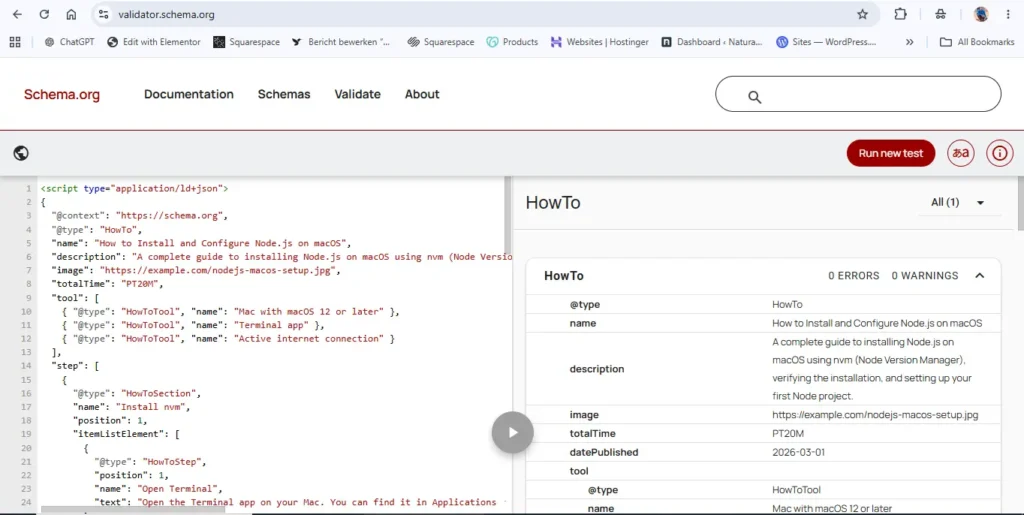
Example 2: Complex Sectioned HowTo (With HowToSection Groups)
A multi-phase procedure with distinct sections — for longer, more complex tasks.
					<script type="application/ld+json">
{
  "@context": "https://schema.org",
  "@type": "HowTo",
  "name": "How to Install and Configure Node.js on macOS",
  "description": "A complete guide to installing Node.js on macOS using nvm (Node Version Manager), verifying the installation, and setting up your first Node project.",
  "image": "https://example.com/nodejs-macos-setup.jpg",
  "totalTime": "PT20M",
  "tool": [
    { "@type": "HowToTool", "name": "Mac with macOS 12 or later" },
    { "@type": "HowToTool", "name": "Terminal app" },
    { "@type": "HowToTool", "name": "Active internet connection" }
  ],
  "step": [
    {
      "@type": "HowToSection",
      "name": "Install nvm",
      "position": 1,
      "itemListElement": [
        {
          "@type": "HowToStep",
          "position": 1,
          "name": "Open Terminal",
          "text": "Open the Terminal app on your Mac. You can find it in Applications → Utilities, or search for it with Spotlight (Cmd + Space, then type 'Terminal')."
        },
        {
          "@type": "HowToStep",
          "position": 2,
          "name": "Run the nvm install script",
          "text": "Paste the following command into Terminal and press Enter: curl -o- https://raw.githubusercontent.com/nvm-sh/nvm/v0.39.7/install.sh | bash. Wait for the installation to complete."
        },
        {
          "@type": "HowToStep",
          "position": 3,
          "name": "Reload your shell profile",
          "text": "Close and reopen Terminal, or run: source ~/.zshrc (if you use Zsh, which is the default on recent macOS) or source ~/.bash_profile (if you use Bash). This loads nvm into your current session."
        }
      ]
    },
    {
      "@type": "HowToSection",
      "name": "Install Node.js",
      "position": 2,
      "itemListElement": [
        {
          "@type": "HowToStep",
          "position": 1,
          "name": "Verify nvm is working",
          "text": "Run: nvm --version. You should see a version number printed, confirming nvm is installed correctly."
        },
        {
          "@type": "HowToStep",
          "position": 2,
          "name": "Install the LTS version of Node.js",
          "text": "Run: nvm install --lts. This downloads and installs the current Long-Term Support version of Node.js — the most stable option for most projects."
        },
        {
          "@type": "HowToStep",
          "position": 3,
          "name": "Verify Node.js installation",
          "text": "Run: node --version and npm --version. Both commands should return version numbers, confirming Node.js and npm (Node Package Manager) are installed."
        }
      ]
    },
    {
      "@type": "HowToSection",
      "name": "Create your first Node project",
      "position": 3,
      "itemListElement": [
        {
          "@type": "HowToStep",
          "position": 1,
          "name": "Create a project folder",
          "text": "Run: mkdir my-first-node-project && cd my-first-node-project. This creates a new directory and moves into it."
        },
        {
          "@type": "HowToStep",
          "position": 2,
          "name": "Initialise a Node project",
          "text": "Run: npm init -y. This creates a package.json file with default settings, establishing the directory as a Node.js project."
        },
        {
          "@type": "HowToStep",
          "position": 3,
          "name": "Create and run a test file",
          "text": "Run: echo 'console.log(\"Node.js is working!\")' > index.js && node index.js. You should see 'Node.js is working!' printed in Terminal. Your Node environment is ready."
        }
      ]
    }
  ],
  "author": {
    "@type": "Person",
    "name": "Priya Mehta"
  },
  "datePublished": "2026-03-01"
}
</script>
Breaking down the key structural elements:
yield — What the user has at the end of the procedure. For cooking it’s a serving count. For DIY it’s the finished item. For software setup it’s the configured environment. This field appears in some rich result formats and helps users quickly verify they’re attempting the right tutorial.
estimatedCost as MonetaryAmount — Using the full MonetaryAmount object with currency and value is more machine-readable than a text string. Google can parse and display the cost more reliably in this structured format.
HowToSection with itemListElement — Sections group steps under named phases. The section’s name becomes a visible phase header in rich results. Steps within sections inherit their position from both their section and their position within the section.
Step name vs step text — The name is a short label for the step (displayed as a heading in rich results). The text is the full instruction. Both are valuable — name creates scannable headings, text provides the complete instruction.
HowTo vs Recipe Schema — Knowing When to Use Which
Recipe is technically a subtype of HowTo — it inherits all HowTo properties and adds cooking-specific ones like cookingMethod, cuisine, nutrition, recipeIngredient, cookTime, and recipeYield.
The decision between the two is straightforward:
Use Recipe when your content is a food recipe — a cooking instruction set with ingredients, serving information, nutritional data, and cuisine type. Recipe schema unlocks recipe-specific rich results including cook time, serving size, calorie count, and the recipe carousel.
Use HowTo when your content is any other form of instructional content, including non-recipe food-adjacent tutorials (how to descale a kettle, how to season a cast iron pan, how to set up a coffee station), craft and DIY guides, technical tutorials, professional procedure guides, and any step-by-step instruction that doesn’t fit the cooking recipe format.
The test: does your content have ingredients with quantities, a cooking method, and a food yield? → Recipe. Does it explain how to do something non-cooking, or cover food preparation without traditional recipe structure? → HowTo.
Mixing the two — using Recipe schema on a non-recipe page — violates Google’s structured data guidelines and can result in validation errors or manual actions.
HowTo Schema and Google's E-E-A-T Evaluation
Because HowTo extends CreativeWork, it inherits the author property — and this matters significantly for content quality assessment.
Google’s E-E-A-T (Experience, Expertise, Authoritativeness, Trustworthiness) framework applies to instructional content just as it does to informational articles. A home improvement tutorial written by a qualified tradesperson is evaluated differently from an anonymous one. A medical procedure guide authored by a licensed clinician is evaluated differently from one with no stated author.
Using the author property in your HowTo schema — linked to an Person entity with a name, URL, and verifiable credentials — signals to Google that your instructions have a qualified, identifiable author behind them. Combined with datePublished and dateModified (showing your content is actively maintained), this creates the structured foundation for strong E-E-A-T signals on instructional pages.
For how-to content in YMYL (Your Money or Your Life) areas — health, safety, legal, financial — having a properly attributed author in your schema is particularly important. Google applies significantly higher scrutiny to instructional content that could cause harm if followed incorrectly, and author attribution is one of the primary trust signals it looks for.
Common HowTo Schema Mistakes to Avoid
Mistake 1: Using HowTo for Content That Isn’t Step-by-Step Instructions HowTo is specifically for instructional, procedural content. An article titled “How to Choose the Right Running Shoes” that discusses considerations without providing literal steps is not a HowTo — it’s an informational article. Using Article schema for that content is correct. HowTo schema on non-procedural content is misleading and produces validation errors.
Mistake 2: Incorrect ISO 8601 Duration Format This is the most common technical error. 30 minutes is not valid — it must be PT30M. 1 hour must be PT1H. 90 minutes should be PT1H30M. The generator handles this conversion automatically, but manual implementations frequently get this wrong.
Mistake 3: Using Recipe Schema for Non-Recipe Content If your how-to involves food but isn’t a traditional recipe with ingredients and cooking method, use HowTo, not Recipe. A guide on how to brew coffee, how to make cold foam for lattes, or how to properly store fresh herbs is a HowTo, not a Recipe.
Mistake 4: Putting All Steps in One Giant HowToStep Text Block Each distinct action should be a separate HowToStep with its own position. Writing an entire multi-step procedure as a single step with a long text paragraph defeats the purpose of structured data — Google can’t extract individual steps to display in rich results.
Mistake 5: Omitting Step Positions The position property on both HowToSection and HowToStep is critical for Google to understand the correct sequence. Missing positions result in steps being displayed in an undefined order.
Mistake 6: Schema That Doesn’t Match the Page Every step in your schema must be visible and readable on the actual page. If your schema describes ten steps but only five are on the page (the others are behind a login or in a PDF), that mismatch violates Google’s content guidelines for structured data.
Mistake 7: Confusing HowToTool and HowToSupply As covered earlier — tools are reusable, supplies are consumed. A paint brush is a tool. Paint is a supply. Correctly categorising these improves the practical usefulness of your schema to both search engines and users.
Monitoring HowTo Rich Results in Search Console
After deploying HowTo schema, use Google Search Console to track implementation health and performance.
Navigate to Search Console → Rich Results and look for the HowTo report type. This shows which pages have valid markup, which have errors, and how those pages are performing in terms of impressions and clicks from the structured step rich result.
After first deployment, allow several days for Google to crawl and process your pages. Look for an increase in valid items with no corresponding increase in invalid items. Fix any errors immediately — HowTo schema errors typically fall into three categories: missing required properties (usually name or step), incorrect duration format, and schema-to-page content mismatches.
Use the URL Inspection tool for any page that should have valid schema but isn’t appearing in the rich results report. Check that the page is crawlable, that the JSON-LD is present in the page source, and that no noindex or nosnippet directives are blocking the content.
Frequently Asked Questions
What is a HowTo Schema Markup Generator?
A HowTo Schema Markup Generator is a free online tool that converts your step-by-step instructional content into valid HowTo JSON-LD structured data code. Instead of manually writing the nested HowToSection, HowToStep, HowToDirection, HowToTip, HowToTool, and HowToSupply object hierarchy — with correct positions, ISO 8601 time formats, and MonetaryAmount cost structures — you fill in a form and the generator produces clean, validated output. Our generator supports both simple flat step lists and complex sectioned procedures, covering every field in the Schema.org V30.0 HowTo specification including author attribution, yield, estimated cost, and per-step images.
What content types can use HowTo schema?
Any web page containing step-by-step instructions for completing a task can use HowTo schema. This includes DIY and home improvement guides, tech and software tutorials, cooking and food preparation instructions (non-recipe format), beauty and wellness routines, craft and making guides, business process guides, health procedure instructions, educational skill-building tutorials, and professional workflow documentation. The key criterion is that the content must be genuinely instructional — a sequence of actions that achieves a specific result — not just informational or advisory content about a topic.
What is the difference between HowTo and Recipe schema?
Recipe is a subtype of HowTo specifically designed for food recipes with ingredients, cooking methods, and nutritional information. HowTo is the parent type for all other instructional content. Use Recipe when your content has ingredient lists with quantities, a defined cooking method (baking, frying, steaming), and a food serving yield. Use HowTo for all other procedural content, including non-traditional food content that doesn’t fit the recipe format. Never apply Recipe schema to non-recipe content — it will fail validation and potentially trigger a structured data quality issue.
How do I format the totalTime field in HowTo schema?
Duration fields in HowTo schema use ISO 8601 duration format. The format starts with P and uses H for hours and M for minutes (preceded by T for time units): 30 minutes = PT30M, 1 hour = PT1H, 1 hour 30 minutes = PT1H30M, 2 hours 45 minutes = PT2H45M, 1 day = P1D. Our generator converts natural language time input (hours and minutes as separate number fields) to the correct ISO 8601 format automatically. If you’re implementing manually, double-check your format using the Schema Markup Validator at validator.schema.org.
When should I use HowToSection instead of flat HowToStep objects?
Use HowToSection when your procedure has distinct phases that benefit from grouping — for example, Preparation, Assembly, and Finishing for a DIY project, or Install, Configure, and Test for a software setup guide. Sections provide named phase headers in rich results and help users understand which stage of a multi-phase process they’re in. For simpler procedures with fewer than about six steps and no natural phase structure, flat HowToStep objects without sections are cleaner and sufficient.
Does adding HowTo schema guarantee rich results will appear?
No — and it’s important to understand this distinction. Valid HowTo schema makes your page eligible for the step-by-step rich result. Whether Google actually displays it depends on factors including your site’s overall quality signals, the competitive landscape of the query, the query’s context and intent, and Google’s algorithmic decisions about how to best present results. What is guaranteed: without the schema, you have no chance of the rich result. With it, you’re in the eligible pool every time a relevant query is made.
Can I use HowTo schema on pages that also have other schema types?
Yes — HowTo schema combines well with other types on the same page. A how-to page on a blog might have both a HowTo block (for the instructional content) and an Article or BlogPosting block (for the publication metadata). A product how-to might combine HowTo with Product or Review. Use separate <script type="application/ld+json"> blocks for each type — they don’t conflict, and Google processes each independently.
How many steps should a HowTo have?
There’s no minimum or maximum specified in the Schema.org specification or Google’s guidelines. Practically, most effective HowTo schema implementations have between 3 and 15 steps. Fewer than 3 steps often means the content isn’t truly procedural. More than 15–20 steps usually suggests the procedure would benefit from being broken into sections or split into multiple guides. The priority is accuracy to your actual content — your schema should have exactly as many steps as are on your page, neither more nor fewer.
What happens if my HowTo schema steps don’t match what’s on the page?
This violates Google’s general structured data guidelines, which require that markup accurately represents the content on the page. If your schema declares 10 steps but only 7 are visibly readable on the page, or if your step text in the schema differs significantly from the step text displayed on the page, Google may ignore the schema or apply a manual action. Always ensure your schema exactly mirrors your published content, and update the schema whenever you edit the instructions on the page.
Why HowTo Schema Is One of the Highest-Impact Structured Data Implementations for Content Sites
Among all the schema types available to content publishers, HowTo consistently ranks as one of the highest-impact implementations — for one simple reason: it produces rich results that directly serve user intent at the moment of search.
When someone searches “how to install a radiator”, “how to write a cover letter”, or “how to make croissants from scratch”, they’re not looking for general information about radiators, employment applications, or French pastry. They want to know the specific steps. A HowTo rich result that shows those steps directly in the search result — with images, timing, and materials — serves that intent completely, builds instant credibility for your site as the authoritative source, and drives qualified, task-oriented traffic.
The generator on this page produces output that meets every specification in Schema.org V30.0 for the HowTo type — the correct nested object hierarchy, valid ISO 8601 duration format, properly structured MonetaryAmount cost fields, and complete step and section nesting. Every output passes Google’s Rich Results Test and the Schema Markup Validator without modification.
That’s the gap this tool closes: between having instructional content on your site and having that content work as hard as possible for you in search — for every “how to” query your audience types, across Google Search, Google Assistant, and AI search platforms.
HowTo is defined at schema.org/HowTo as part of the inheritance chain Thing > CreativeWork > HowTo. The Recipe subtype is defined at schema.org/Recipe. All related types (HowToStep, HowToSection, HowToDirection, HowToTip, HowToTool, HowToSupply) are defined at their respective schema.org URLs. This generator produces output compliant with Schema.org V30.0 (March 19, 2026).
Latest Updates — HowTo Schema Generator
This tool and its documentation are actively maintained to reflect the latest changes from Schema.org. Below is a record of significant updates.
🗓️ May 2026 — Generator Launched with Full Five-Object HowTo Ecosystem Support
This generator was built because the majority of existing HowTo schema tools online implement only the minimal subset of the HowTo specification — a flat array of step text strings, maybe a total time field. The complete HowTo object ecosystem defined in Schema.org V30.0 is substantially richer, and implementing only the minimum leaves significant structured data value on the table.
What the generator supports at launch — built from Schema.org V30.0 (March 19, 2026):
Full five-object ecosystem:
HowTo— parent container withname,description,image,estimatedCost(asMonetaryAmount),totalTime,prepTime,performTime,yield,author,datePublished,dateModified,video, andinLanguageHowToSection— named phase groupings withpositionanditemListElementarrays for complex multi-phase proceduresHowToStep— individual action units withposition,name,text,image, and nested direction/tip supportHowToDirection— the instruction text within a step, withbeforeMedia,duringMedia, andafterMediaImageObjectsupportHowToTip— contextual guidance objects within steps, displayed distinctly from directions in some Google rich result implementationsHowToTool— reusable items used during the procedure, with optionalimagesupportHowToSupply— consumable items used up during the procedure, with optionalimagesupport
ISO 8601 duration auto-conversion — Natural language time inputs (hours and minutes as integers) are automatically converted to ISO 8601 duration format (PT1H30M), eliminating the most common technical error in HowTo schema implementations.
Dual structure support — The generator supports both flat step lists (simple procedures) and sectioned procedures (complex multi-phase guides) with the correct nesting structure for each. Users choose their structure at the start and the generator adapts the output format accordingly.
🗓️ March 2026 — Schema.org V30.0 Confirms HowTo Type Stability (March 19, 2026)
Schema.org released version 30.0 on March 19, 2026. The HowTo type was reviewed and confirmed as stable in this release, with all five sub-types (HowToSection, HowToStep, HowToDirection, HowToTip, HowToTool, HowToSupply) confirmed at their canonical schema.org URLs.
Key V30.0 confirmations for HowTo implementations:
step property supersedes steps — The steps property (plural) has been formally superseded by the step property (singular) in the Schema.org specification. Both are technically still parsed, but all new implementations should use step (singular). This generator enforces step in all output.
Recipe confirmed as only subtype — Recipe remains the only recognised subtype of HowTo in V30.0. Content creators using HowTo schema for food-related instructional content that doesn’t fit the Recipe format (cooking techniques, equipment guides, kitchen setup tutorials) are using the correct type. This generator does not attempt to force Recipe subtype for food content — the user’s choice of HowTo is honoured.
video property from CreativeWork confirmed — The video property (accepting a VideoObject) is fully supported on HowTo in V30.0, allowing tutorial pages with embedded video walkthroughs to include their video structured data within the HowTo block. This enables Google to understand the relationship between the written steps and the video, potentially improving both text and video rich result eligibility.
dateModified recommended for maintained tutorials — V30.0 documentation confirms dateModified as a valuable CreativeWork property for HowTo pages. For tutorial sites that update their instructions over time — reflecting new software versions, updated best practices, or improved techniques — keeping dateModified current is a strong content freshness signal.
Reference: Schema.org/HowTo — V30.0, 2026-03-19
🗓️ November 2025 — HowToTip and HowToDirection Nesting Guidance Clarified
What changed:
Community discussion within the Schema.org GitHub repository and practitioner feedback highlighted persistent confusion around when to use HowToDirection vs plain text on a HowToStep, and when to include HowToTip objects within steps.
This generator’s documentation was updated to clarify the practical distinction:
text on HowToStep directly — The simplest implementation. When a step has one clear instruction and no tips, use text directly on the HowToStep object. This is what most implementations need for straightforward procedures.
HowToDirection + HowToTip in itemListElement — When a step has both an instruction and a contextual tip, nest them as HowToDirection and HowToTip objects within the step’s itemListElement array. The HowToDirection holds the action. The HowToTip holds the supporting context. This nesting pattern is what enables the beforeMedia, duringMedia, and afterMedia image properties on HowToDirection objects.
The generator’s step builder now offers both patterns clearly — simple text-only steps and direction+tip composite steps — with visual guidance on which to use for which content.
Sources & References
This tool’s output and documentation are maintained in alignment with the following official resources:
- Schema.org/HowTo — Schema.org V30.0 (March 19, 2026)
- Schema.org/HowToStep — Schema.org Official Specification
- Schema.org/HowToSection — Schema.org Official Specification
- Schema.org/HowToTool — Schema.org Official Specification
- Schema.org/HowToSupply — Schema.org Official Specification
- Google HowTo Structured Data Guidelines — Google Search Central
- ISO 8601 Duration Standard — Wikipedia Reference
- Schema Markup Validator — Schema.org
Last reviewed by the iLoveSchema editorial team: May 2026